<?xml version="1.0" encoding="utf-8"?><feed xmlns="http://www.w3.org/2005/Atom" ><generator uri="https://jekyllrb.com/" version="3.9.5">Jekyll</generator><link href="https://adamdemasi.com/feed.xml" rel="self" type="application/atom+xml" /><link href="https://adamdemasi.com/" rel="alternate" type="text/html" /><updated>2025-07-14T02:37:34+00:00</updated><id>https://adamdemasi.com/feed.xml</id><title type="html">kirbblog</title><author><name>Adam Demasi</name></author><entry><title type="html">Microsoft broke Windows Update on Windows 7 (again)</title><link href="https://adamdemasi.com/2025/07/04/windows-7-microsoft-update-issue.html" rel="alternate" type="text/html" title="Microsoft broke Windows Update on Windows 7 (again)" /><published>2025-07-04T06:20:00+00:00</published><updated>2025-07-04T06:20:00+00:00</updated><id>https://adamdemasi.com/2025/07/04/windows-7-microsoft-update-issue</id><content type="html" xml:base="https://adamdemasi.com/2025/07/04/windows-7-microsoft-update-issue.html"><![CDATA[<p><img src="/content/images/2025-07-04-windows-update-error-80248015.png" alt="Windows Update on Windows 7 says “Windows could not search for new updates: An error occurred while checking for new updates for your computer. Error(s) found: Code 80248015.”" /></p>

<p>Earlier this week, users of Legacy Update started reporting errors when checking for updates on Windows 7.</p>

<p>The most common variant of this is error <strong>80728015</strong> when checking for updates. That error code is <a href="https://legacyupdate.net/errorcodes">documented</a> with the message:</p>

<blockquote>
  <p>An operation did not complete because the registration of the service has expired.</p>
</blockquote>

<p>Interesting - “registration” of “services” usually relates to Microsoft Update, which extends <em>Windows</em> Update (the naming is terrible, I know) with the ability to receive updates beyond just Windows itself, including updates for Microsoft Office, Visual Studio, and SQL Server, as well as free software offers such as Windows Search, Microsoft Security Essentials, and Microsoft Edge.</p>

<p>Rather than an error code, some users instead got a very misleading error dialog:</p>

<blockquote>
  <p>Windows Update cannot currently check for updates, because the service is not running. You may need to restart your computer.</p>
</blockquote>

<p>However, the service is in fact running, and a system restart has no effect.</p>

<p>As spotted by <a href="https://github.com/renodr">Douglas Reno</a>, who works alongside me on the Legacy Update project, when we peek at the “authorization” XML file used to specify how Microsoft Update should be configured, it lists an expiry date of 2025-07-01, at midnight UTC.</p>

<p>Here is the file, reformatted for brevity:</p>

<div class="language-xml highlighter-rouge"><div class="highlight"><pre class="highlight"><code><span class="nt">&lt;ProviderAuthorizationInfo&gt;</span>
	<span class="nt">&lt;ServiceID&gt;</span>7971f918-a847-4430-9279-4a52d1efe18d<span class="nt">&lt;/ServiceID&gt;</span>
	<span class="nt">&lt;CabVersion&gt;</span>8110<span class="nt">&lt;/CabVersion&gt;</span>
	<span class="nt">&lt;IssuedDate&gt;</span>2017-12-01T00:00:00.0000000-00:00<span class="nt">&lt;/IssuedDate&gt;</span>
	<span class="nt">&lt;ExpiryDate&gt;</span>2025-07-01T00:00:00.0000000-00:00<span class="nt">&lt;/ExpiryDate&gt;</span>
	<span class="nt">&lt;RedirectUrl&gt;</span>http://ds.download.windowsupdate.com/v11/2/microsoftupdate/redir/v6-muredir.cab<span class="nt">&lt;/RedirectUrl&gt;</span>
	<span class="nt">&lt;RedirectUrl&gt;</span>http://fe2.update.microsoft.com/v11/2/microsoftupdate/redir/v6-muredir.cab<span class="nt">&lt;/RedirectUrl&gt;</span>
	<span class="nt">&lt;OffersWindowsPatches&gt;</span>true<span class="nt">&lt;/OffersWindowsPatches&gt;</span>
	<span class="nt">&lt;UIPluginCLSID&gt;</span>3809920F-B9D4-42DA-92E0-E26265E0FB89<span class="nt">&lt;/UIPluginCLSID&gt;</span>
	<span class="nt">&lt;IsManaged&gt;</span>false<span class="nt">&lt;/IsManaged&gt;</span>
	<span class="nt">&lt;CanRegisterWithAU&gt;</span>true<span class="nt">&lt;/CanRegisterWithAU&gt;</span>
	<span class="nt">&lt;ServiceUrl&gt;</span>https://fe2.update.microsoft.com/v6/<span class="nt">&lt;/ServiceUrl&gt;</span>
	<span class="nt">&lt;SetupPrefix&gt;</span>mu<span class="nt">&lt;/SetupPrefix&gt;</span>
	<span class="nt">&lt;LocalizedProperties&gt;</span>
		<span class="nt">&lt;Language&gt;</span>en<span class="nt">&lt;/Language&gt;</span>
		<span class="nt">&lt;Name&gt;</span>Microsoft Update<span class="nt">&lt;/Name&gt;</span>
	<span class="nt">&lt;/LocalizedProperties&gt;</span>
<span class="nt">&lt;/ProviderAuthorizationInfo&gt;</span>
</code></pre></div></div>

<p>This XML file is found inside a cabinet file named <a href="http://ds.download.windowsupdate.com/v11/2/microsoftupdate/redir/v6-muauth.cab">v6-muauth.cab</a>. The cabinet is used to attach a digital signature to the file, preventing a <a href="https://en.wikipedia.org/wiki/Man-in-the-middle_attack">man-in-the-middle attack</a> where the XML is modified to hijack users’ devices to use a malicious Microsoft Update server, while still allowing businesses and ISPs to run an HTTP mirror of download.windowsupdate.com to increase download speeds and save on bandwidth.</p>

<p>As you can see from <code class="language-plaintext highlighter-rouge">&lt;ExpiryDate&gt;</code>, it definitely stopped working because the expiry date lapsed. As seems to happen too often in our industry, apparently nobody set a reminder to make sure it would be updated in advance of the date.</p>

<p>You might notice that it has an <code class="language-plaintext highlighter-rouge">&lt;IssuedDate&gt;</code> of 2017-12-01. That’s fairly recent! After digging further, we learned that <em>this already happened once!</em> On the 4th of that month, <a href="https://www.bleepingcomputer.com/news/microsoft/windows-7-update-giving-a-80248015-error-heres-why-and-how-to-fix-it-/">Bleeping Computer covered</a> an error Windows 7 users were receiving when checking for updates. That error is <strong>80248015</strong> - pretty familiar, right? Microsoft allowed this file to expire, not on the 1st but rather on the 4th (more specifically, 35 seconds before midnight in US Pacific time, or 8:00 PM UTC), and did not manage to upload a new file until the 6th at 10:02 AM Pacific (6:02 PM UTC). This left Microsoft Update broken for 3 days.</p>

<div class="language-xml highlighter-rouge"><div class="highlight"><pre class="highlight"><code>	<span class="nt">&lt;IssuedDate&gt;</span>2013-12-03T11:59:25.5067616-08:00<span class="nt">&lt;/IssuedDate&gt;</span>
	<span class="nt">&lt;ExpiryDate&gt;</span>2017-12-03T11:59:25.5067616-08:00<span class="nt">&lt;/ExpiryDate&gt;</span>
</code></pre></div></div>

<h2 id="the-fix">The fix</h2>

<p>…is to just bump the expiry date again. Indeed, yesterday at 7:32 PM Pacific (2:32 AM UTC), 2 days late, that’s exactly what Microsoft did. The file now looks like this:</p>

<div class="language-xml highlighter-rouge"><div class="highlight"><pre class="highlight"><code>	<span class="nt">&lt;IssuedDate&gt;</span>2025-07-01T15:00:08.7715059-07:00<span class="nt">&lt;/IssuedDate&gt;</span>
	<span class="nt">&lt;ExpiryDate&gt;</span>2033-07-01T15:00:08.7715059-07:00<span class="nt">&lt;/ExpiryDate&gt;</span>
</code></pre></div></div>

<p>Curiously, the timestamps are once again in Pacific time, as a precise number down to the microsecond. This matches how the 2013 version of the file is written.</p>

<p>The 2013 version of muauth.cab lasted 4 years. The 2017 version lasted 7 years and 7 months. The 2025 version will last 8 years. Interestingly, prior versions of the file I can find were issued on 2007-05-02, and are set to expire on 2027-05-02. (These do not appear to still be in use.)</p>

<h2 id="why-does-this-file-expire">Why does this file expire?</h2>

<p>It’s not clear to me why this file needs to expire. In fact, Microsoft agrees. In Windows 8.1, the way Microsoft Update is registered changed, introducing a new component named SLS, which we believe means Service Locator Service. It allows Microsoft to provide different versions of the configuration depending on the Windows version, build number, architecture (x86 vs x64 vs ARM, etc.), language, Windows Update agent version, and other details that can be particularly relevant to your device. By contrast, the same v6-muauth.cab file is shared by all versions from Windows 2000 to Windows 8, which could be running wildly different versions of the Windows Update agent.</p>

<p>Here is how the SLS manifest for Microsoft Update looks for Windows 8.1:</p>

<div class="language-xml highlighter-rouge"><div class="highlight"><pre class="highlight"><code><span class="c">&lt;!-- PRODUCTION MU v6 LIVE --&gt;</span>
<span class="nt">&lt;ServiceEnvironment</span>
	<span class="na">ServiceID=</span><span class="s">"7971f918-a847-4430-9279-4a52d1efe18d"</span>
	<span class="na">ID=</span><span class="s">"MUv6LiveProduction"</span>
	<span class="na">Revision=</span><span class="s">"1"</span><span class="nt">&gt;</span>
	<span class="nt">&lt;WUClientData&gt;</span>
		<span class="nt">&lt;Protocol</span>
			<span class="na">clientServerUrl=</span><span class="s">"https://fe2.update.microsoft.com/v6/"</span>
			<span class="na">clientServerUrlCR=</span><span class="s">"https://fe2cr.update.microsoft.com/v6/"</span>
			<span class="na">reportingServerUrl=</span><span class="s">"http://statsfe2.update.microsoft.com/"</span>
			<span class="na">elementVersion=</span><span class="s">"1"</span> <span class="nt">/&gt;</span>
		<span class="nt">&lt;SelfUpdate</span>
			<span class="na">selfUpdateUrl=</span><span class="s">"https://fe2.update.microsoft.com/v10/3/microsoftupdate"</span>
			<span class="na">elementVersion=</span><span class="s">"1"</span> <span class="nt">/&gt;</span>
		<span class="nt">&lt;ServiceID&gt;</span>7971f918-a847-4430-9279-4a52d1efe18d<span class="nt">&lt;/ServiceID&gt;</span>
		<span class="nt">&lt;OffersWindowsPatches&gt;</span>true<span class="nt">&lt;/OffersWindowsPatches&gt;</span>
		<span class="nt">&lt;UIPluginCLSID&gt;</span>3809920F-B9D4-42DA-92E0-E26265E0FB89<span class="nt">&lt;/UIPluginCLSID&gt;</span>
		<span class="nt">&lt;IsManaged&gt;</span>false<span class="nt">&lt;/IsManaged&gt;</span>
		<span class="nt">&lt;CanRegisterWithAU&gt;</span>true<span class="nt">&lt;/CanRegisterWithAU&gt;</span>
		<span class="nt">&lt;ServiceUrl&gt;</span>https://fe2.update.microsoft.com/v6/<span class="nt">&lt;/ServiceUrl&gt;</span>
		<span class="nt">&lt;SetupPrefix&gt;</span>mu<span class="nt">&lt;/SetupPrefix&gt;</span>
		<span class="nt">&lt;LocalizedProperties&gt;</span>
			<span class="nt">&lt;Language&gt;</span>en<span class="nt">&lt;/Language&gt;</span>
			<span class="nt">&lt;Name&gt;</span>Microsoft Update<span class="nt">&lt;/Name&gt;</span>
		<span class="nt">&lt;/LocalizedProperties&gt;</span>
	<span class="nt">&lt;/WUClientData&gt;</span>
	<span class="nt">&lt;StoreClientData</span> <span class="nt">/&gt;</span>
<span class="nt">&lt;/ServiceEnvironment&gt;</span>
</code></pre></div></div>

<p>There are no dates in this file! It appears it never expires. In fact, the cabinet is signed by two certificates that expired in 2019, so there is no concern that it might use expiry dates from the certificate chain (we’ll leave that type of behavior <a href="https://eclecticlight.co/2019/10/18/beware-apple-security-certificates-after-24-october-they-may-have-expired/">up to Apple</a>…).</p>

<p>The exact path this cabinet file can be found at is much more complicated. I split it across multiple lines for clarity:</p>

<div class="language-plaintext highlighter-rouge"><div class="highlight"><pre class="highlight"><code>https://sls.update.microsoft.com
	/SLS
	/{7971F918-A847-4430-9279-4A52D1EFE18D}
	/x64
	/6.3.9600.0
	/0
	?CH=424
	&amp;L=en-US
	&amp;P=
	&amp;PT=0x59
	&amp;WUA=7.9.9600.17092
</code></pre></div></div>

<p>As you might have gathered by now, <code class="language-plaintext highlighter-rouge">{7971f918-a847-4430-9279-4a52d1efe18d}</code> is the unique identifier for the Microsoft Update service. Microsoft loves to use GUIDs for everything.</p>

<h2 id="what-to-do-if-youre-affected-by-this">What to do if you’re affected by this</h2>

<p><em>This section is no longer necessary, but I already wrote it and took nice screenshots, so…</em></p>

<p>To avoid this for now, disable Microsoft Update.</p>

<p>You can do so by going to <strong>Start</strong> → <strong>Control Panel</strong> → <strong>Windows Update</strong> → <strong>Change settings</strong>, and unticking “Give me updates for Microsoft products and check for new optional Microsoft software when I update Windows” (Windows 7) or “Give me updates for other Microsoft products when I update Windows” (Windows 8).</p>

<p><img src="/content/images/2025-07-04-disable-microsoft-update.png" alt="Disabling Microsoft Update on Windows 7" /></p>

<p>If you use Legacy Update, we detect the error and display a useful explanation of the issue, and offer to disable Microsoft Update for you.</p>

<p><img src="/content/images/2025-07-04-legacy-update-80248015-alert.png" alt="Legacy Update error page titled “There is a temporary service issue with Microsoft Update”" /></p>

<p>If you already disabled Microsoft Update to work around this issue, you can install Legacy Update again to re-enable it.</p>

<p>As I’ve now learned that SLS was introduced in Windows 8.1, not Windows 8 as I previously assumed,<sup id="fnref:win8sls" role="doc-noteref"><a href="#fn:win8sls" class="footnote" rel="footnote">1</a></sup> we’ve tweaked the upcoming Legacy Update 1.11.1 release to offer a checkbox to enable Microsoft Update on Windows 8 and 8.1, in addition to Windows 7 as we already did. It doesn’t hurt to have the option anyway - the method of registering for Microsoft Update is the same on every version of Windows from 2000 SP3, to 11 25H2.</p>

<p><img src="/content/images/2025-07-04-legacy-update-enable-microsoft-update.png" alt="Legacy Update 1.11.1 running on Windows 8, with the Enable Microsoft Update checkbox highlighted" /></p>

<h2 id="post-mortem">Post-mortem</h2>

<p>When the issue first showed up, we <a href="https://github.com/LegacyUpdate/LegacyUpdate/issues/369">brainstormed</a> a number of ways to work around this issue, in case Microsoft decided to forego fixing this. Fortunately, we didn’t need to use any of those options.</p>

<p>Windows 7 and later, at least for now, continue to be fully supported by the official fe2.update.microsoft.com service (ignoring <a href="/2025/06/28/what-is-going-on-with-windows-update-drivers.html">bugs</a> that prevent Windows 7 and 8 from completing update checks out-of-box). Legacy Update hosts a proxy service to connect to this server, which we use on Windows 2000, XP, and Vista. Due to the way Microsoft Update is designed, configuring a custom server in the registry also inherently allows it to receive Microsoft Update updates. It also means the expiry doesn’t apply, because the authorization file is no longer relevant. This is the workaround we most likely would have used.</p>

<p>By the time we reach July 2033, I expect that standards of secure TLS versions and ciphers will have already increased, locking Windows 7 out from Windows Update. This would require Legacy Update to configure its proxy server to fix Windows Update access on Windows 7 devices. We’ll just need to wait and see what the next 8 years are like.</p>
<div class="footnotes" role="doc-endnotes">
  <ol>
    <li id="fn:win8sls" role="doc-endnote">
      <p>Introducing SLS with Windows 8 made sense in my mind, since this is the version of Windows that launched the Windows Store, which is built on Windows Update. Windows 8.1 somewhat acted as a prototype of the “Windows as a Service” model, so I can see this rather being an early stage of the major changes Windows 10 would make to servicing. <a href="#fnref:win8sls" class="reversefootnote" role="doc-backlink">&#8617;</a></p>
    </li>
  </ol>
</div>]]></content><author><name>Adam Demasi</name></author><summary type="html"><![CDATA[A configuration file expired, again.]]></summary><media:thumbnail xmlns:media="http://search.yahoo.com/mrss/" url="https://adamdemasi.com/content/images/2025-07-04-windows-update-error-80248015.png" /><media:content medium="image" url="https://adamdemasi.com/content/images/2025-07-04-windows-update-error-80248015.png" xmlns:media="http://search.yahoo.com/mrss/" /></entry><entry><title type="html">What is going on with Windows Update and drivers?</title><link href="https://adamdemasi.com/2025/06/28/what-is-going-on-with-windows-update-drivers.html" rel="alternate" type="text/html" title="What is going on with Windows Update and drivers?" /><published>2025-06-28T03:30:00+00:00</published><updated>2025-06-28T03:30:00+00:00</updated><id>https://adamdemasi.com/2025/06/28/what-is-going-on-with-windows-update-drivers</id><content type="html" xml:base="https://adamdemasi.com/2025/06/28/what-is-going-on-with-windows-update-drivers.html"><![CDATA[<p><img src="/content/images/2025-06-28-windows-update-drivers.jpg" alt="An assortment of hardware device icons from Windows XP, surrounding a blue shield with question mark." /></p>

<p>Just wanted to write up some thoughts about Microsoft’s <a href="https://techcommunity.microsoft.com/blog/HardwareDevCenter/removal-of-unwanted-drivers-from-windows-update/4425647">recent announcement</a> that old drivers will be removed from Windows Update.</p>

<p>The short version of it is that “legacy drivers that have newer replacements” will soon be hidden from Windows Update, and in 6 months’ time, depending how the industry responds to this, they may be fully deleted. As you <a href="https://legacyupdate.net/">might imagine</a>, that “legacy” keyword has brought some curious questions my way.</p>

<p>There is some real ambiguity to what Microsoft is trying to do here. Here is how I understand the timeline of what will be happening with drivers. <strong>This is only my interpretation,</strong> and I can be wrong about any or all of this.</p>

<ol>
  <li>At some point in the near future, Microsoft will perform a soft deprecation of all versions other than the latest of each driver, such that they are no longer offered in WSUS as an option to deploy to devices. The drivers will likely still be accessible by manually finding and downloading them on the <a href="https://catalog.update.microsoft.com/">Microsoft Update Catalog</a>.</li>
  <li>Hardware manufacturers will then have a 6 month window to raise concerns with Microsoft. A manufacturer can suggest that Microsoft reinstate old versions of a driver, but they should be prepared to give a really good reason for it.</li>
  <li>After 6 months, any remaining drivers that did not get reinstated will be removed forever. It’s not clear whether this means they will only cease to be offered by WSUS, or if they will also disappear from the Microsoft Update Catalog, or if the files will also be deleted.</li>
  <li>At some later time, a policy will be instated that old drivers will expire on a continuous basis, the exact details not discussed yet. They may also consider removing drivers that are not considered “legacy drivers that have newer replacements already on Windows Update”.</li>
</ol>

<p><strong>I don’t have any reason to believe this will affect old devices.</strong> You should still be able to automatically receive drivers for something like an Nvidia 700 series GPU, or a Wi-Fi PCMCIA card - including from Legacy Update, which relies on the public Windows Update service.</p>

<p>But why is this being done? As I <a href="https://bsky.app/profile/legacyupdate.net/post/3ls4dbqkxsc2j">posted</a> in a quick first reaction, I think two things are true here:</p>

<p><strong>First, what Microsoft is actually saying:</strong> that this is an initiative to improve security. This is valid, because of <a href="https://techcommunity.microsoft.com/blog/microsoftsecurityexperts/strategies-to-monitor-and-prevent-vulnerable-driver-attacks/4103985">“bring your own vulnerable driver”</a> attacks. This is a malware tactic that takes advantage of an outdated driver that is already installed, or is easy to trick the victim into installing, to gain full unrestricted kernel privileges. If you don’t know operating system design: malware finding its way into the kernel is game over. It has access to everything the infected system has access to, and can take measures to <a href="https://en.wikipedia.org/wiki/Rootkit">hide itself</a> to hang around as long as possible. In the past few years, Microsoft has been stepping up defences against BYOVD attacks, particularly through the <a href="https://learn.microsoft.com/en-us/windows/security/application-security/application-control/app-control-for-business/design/microsoft-recommended-driver-block-rules">Vulnerable Driver Blocklist</a>. Vulnerable drivers Microsoft has blocked include ones for Realtek audio, VirtualBox, Nvidia NVFlash, and <a href="https://bsky.app/profile/legacyupdate.net/post/3lnjvh7db6k2f">something</a> from Asus. They also recently took the unpopular major step of <a href="https://gamersnexus.net/features/insecure-code-vs-entire-rgb-industry-winring-0-driver-ft-wendell-level1-techs">blocking WinRing0</a>, a fundamentally flawed and vulnerable driver, yet still widely used to access hardware such as RGB and fan controllers.</p>

<p>While Windows Update itself will only ever install the latest version of a driver (sometimes even against your wishes), businesses can choose which updates they roll out to their devices. This tends to be done with <a href="https://en.wikipedia.org/wiki/Windows_Server_Update_Services">Windows Server Update Services</a> (WSUS), or one of Microsoft’s numerous replacements of it. Sometimes you <em>just</em> need an old version of a driver or update. The new version breaks something, or your business requires the utmost software stability, or is legally obligated to audit all software running on systems exposed to sensitive data. As far as I’m aware, since Windows Update v4 (2001), Microsoft has never deleted old drivers or updates, except where they needed to stop the rollout of a seriously broken update. Despite potential security concerns, an old release could be better for your needs, and it is assumed that your IT department has made the risk assessment decision. With this change, if you require an outdated driver, it must be deployed through some means other than Windows Update.</p>

<p><strong>Second, what Microsoft isn’t saying,</strong> or rather, what they <em>were</em> saying up until a few months ago. Let’s go back to WSUS. The current generation of it started off as version 3.0, which released not long after Windows Vista in 2007. A lot has changed, but a lot has also stayed the same. If you’ve reinstalled Windows 7 sometime since 2015, you might know that its Windows Update servicing system is straight up broken in its out-of-box state, and requires a manual update - that, even then, doesn’t properly solve the problem, just makes it more tolerable. Windows Update has a pretty cool system of describing whether an update is necessary to be installed on the current system, or if it is already installed. It also builds a relationship graph between updates, to indicate when they have been replaced by a newer update that includes all changes from the previous update. That system is also its downfall, causing the Windows Update service to be <a href="https://legacyupdate.net/help/performance">incredibly slow</a> in checking for updates, possibly never completing the check at all. This issue also applies to WSUS, which despite being based on the very robust <a href="https://en.wikipedia.org/wiki/Microsoft_SQL_Server">SQL Server</a>, struggles with the number of drivers Microsoft hosts on Windows Update. <a href="https://bsky.app/profile/legacyupdate.net/post/3ln5i3i3p4k2h">As of April</a>, we know that Windows Update hosts 1,799,339 drivers, and this creates a 138 GB database that requires almost 16 days to synchronise down from the main servers. The WSUS server is brought to its knees, with frequent timeouts while it furiously tries to complete database queries. (The PC used is a Ryzen 5700G with 32 GB of 3600 MHz RAM and 500 GB of NVMe, running Windows Server 2025 and SQL Server 2022.)</p>

<p>The reason we have those numbers is because, in June 2024, Microsoft announced the <a href="https://techcommunity.microsoft.com/blog/windows-itpro-blog/deprecation-of-wsus-driver-synchronization/4177831">deprecation of WSUS’s driver synchronisation</a>, then in September 2024 announced the <a href="https://techcommunity.microsoft.com/blog/windows-itpro-blog/windows-server-update-services-wsus-deprecation/4250436">deprecation of WSUS</a>, indicating that it will no longer be supported <a href="https://learn.microsoft.com/en-us/lifecycle/products/windows-server-2025">after Windows Server 2025</a>, then in April 2025, <a href="https://techcommunity.microsoft.com/blog/windows-itpro-blog/continuing-wsus-support-for-driver-synchronization/4401042">backtracked at the eleventh hour</a> and decided drivers are staying around after all. To preserve the data for use by Legacy Update and the community, I jumped to sync it all down right before it was due to go away. I can respect that Microsoft is trying to move on from software that hasn’t had a major update since forever ago, but this timeline of events is <em>crazy</em>, and comes off mildly tone-deaf that they don’t understand how their customers are using their products. Or, that they perhaps do know, but don’t consider a 34% response to a survey as important enough to register.</p>

<p>Under the announcement, a commenter, ItsADave, <a href="https://techcommunity.microsoft.com/blog/hardwaredevcenter/removal-of-unwanted-drivers-from-windows-update/4425647/replies/4426026">made a suggestion</a> that Microsoft should consider sharing the to-be-deleted drivers with Legacy Update or the Internet Archive. First, I’m flattered that our project is in such a respected and trusted position. I never expected it to be mentioned adjacent a Microsoft announcement that’s being linked back to from major tech news outlets. But to be realistic, I don’t expect this to happen, because the drivers are owned by the hardware manufacturers that wrote them, and they likely only license them to Microsoft for redistribution to end-users and IT administrators. Even if the agreements they have with Microsoft are lenient, the lawyers are very likely not comfortable with handing over other companies’ work to a small project, or even drawing any attention to us, which can be seen as an endorsement to continue running old vulnerable software. Unless proven otherwise, this is entirely for us to deal with as a community. As for the Internet Archive, I would mention that this is a considerable amount of data (6.454 TB), and the optics of one of the most valuable companies of all time deferring a problem to a non-profit library that already has enough battles to fight aren’t particularly positive.</p>

<p>As a side note, I’ve found the Microsoft announcements made on their Tech Community website to be kinda weird, because as we just explored, they come off unclear, vague, and often filled with jargon. They tend to read like nobody has proofread them - the announcement we started this post with blatantly refers to “windows update” in all lowercase <em>four</em> times! The announcement about backtracking on WSUS drivers also interchangeably refers to them as being both “deprecated” and “removed”, while correctly reminding the reader that the terms <a href="https://techcommunity.microsoft.com/blog/windows-itpro-blog/deprecation-what-it-means-in-the-windows-lifecycle/4372457">have very different meanings</a>. The reason there has been confusion and concern about changes like this is because, besides poor discussion with the community, it’s just plain missing the extra attention to wording and clarity from someone good with PR.</p>

<p><small><em>The high resolution Windows XP icons in the banner image come from the excellent <a href="https://www.deviantart.com/marchmountain/art/Windows-XP-High-Resolution-Icon-Pack-916042853">Windows XP High Resolution Icon Pack</a>. Thanks, marchmountain!</em></small></p>]]></content><author><name>Adam Demasi</name></author><summary type="html"><![CDATA[Well-intentioned but poorly communicated.]]></summary><media:thumbnail xmlns:media="http://search.yahoo.com/mrss/" url="https://adamdemasi.com/content/images/2025-06-28-windows-update-drivers.jpg" /><media:content medium="image" url="https://adamdemasi.com/content/images/2025-06-28-windows-update-drivers.jpg" xmlns:media="http://search.yahoo.com/mrss/" /></entry><entry><title type="html">Making sense of the Windows NT 4.0 Start menu banner claims</title><link href="https://adamdemasi.com/2024/07/24/windows-nt-4-start-menu-watermark.html" rel="alternate" type="text/html" title="Making sense of the Windows NT 4.0 Start menu banner claims" /><published>2024-07-24T05:30:00+00:00</published><updated>2024-07-24T05:30:00+00:00</updated><id>https://adamdemasi.com/2024/07/24/windows-nt-4-start-menu-watermark</id><content type="html" xml:base="https://adamdemasi.com/2024/07/24/windows-nt-4-start-menu-watermark.html"><![CDATA[<p>Dave Plummer, a former Windows engineer who you may know from his YouTube channel Dave’s Garage, recently tweeted the following:</p>

<blockquote class="twitter-tweet"><p lang="en" dir="ltr">If I had a LinkedIn bio, I'd definitely mention that I wrote the Windows Start Menu.<br /><br />Well, the non-resume version is that I wrote the code that custom-paints the Start menu, draws the sideways text, background gradient, and so on.  It had been done with a Bitmap in Windows 95, but for WindowsNT that would mean doing it in N languages for V variants of server, workstation, and so on.  That would be a lot of bitmaps with text in them.<br /><br />I wanted to render it live.<br /><br />There's probably a way to render text sideways now, but there wasn't at the time.  Fortunately, with NT, unlike 9x, you could rotate the device context itself.  I'd only been coding for Windows a few months at that point, so it was cool to discover it was even possible.  I tried a quick test and it worked!<br /><br />I used standard GDI calls to render the background gradient, which fades blue-black like the sky on the NT box, then fill anything past that with solid black.<br /><br />And now you know how the start menu draws :-) <a href="https://t.co/QgQqhSFi8w">pic.twitter.com/QgQqhSFi8w</a></p>&mdash; Dave W Plummer (@davepl1968) <a href="https://twitter.com/davepl1968/status/1812559735616577565">July 14, 2024</a></blockquote>
<script async="" src="https://platform.twitter.com/widgets.js" charset="utf-8"></script>

<p>Well, that’s interesting! It might seem like nothing these days - of course you can procedurally draw rotated text, why not? But you have to remember Windows NT 4.0’s minimum system requirements are a 486 at 33 MHz, 16 MB of RAM, and just any VGA graphics card that makes pixels appear on the screen. (VGA here refers to the 1987 IBM PC standard of 640×480 with 16 colors, not the “modern” VGA, specified by <a href="https://en.wikipedia.org/wiki/VESA_BIOS_Extensions">VESA</a>, that stretches as far as 2048×1536 with 24-bit color.) The <a href="https://en.wikipedia.org/wiki/Graphics_Device_Interface">Graphics Device Interface</a> (GDI) library’s performance was dramatically improved in NT 4, so it could plausibly make sense that even the lowest-end systems could draw the gradient and text very quickly. After all, Windows 95 with its minimum spec of 4 MB of RAM managed miracles such as <a href="https://devblogs.microsoft.com/oldnewthing/20151111-00/?p=91972">drawing your desktop wallpaper</a> - at 16-bit 1024×768, that would require about 1.5 MB, which could already be well in use by other programs.</p>

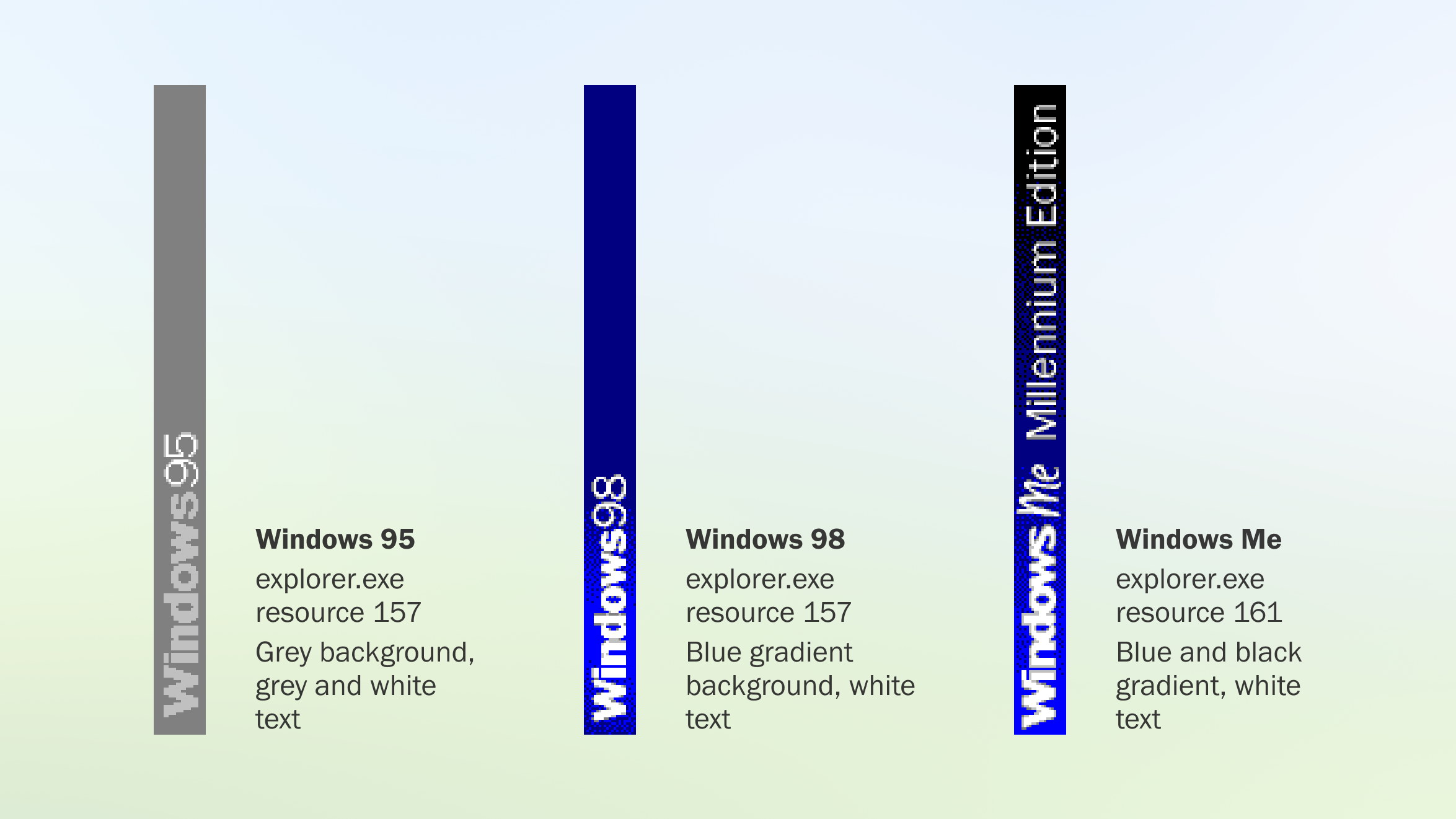
<p>In Dave’s tweet, and subsequent YouTube video, he mentions that Windows 95 simply had a pre-rendered bitmap of its Start menu banner logo embedded into explorer.exe. Indeed, you can find this bitmap pretty easily using a copy of Windows 95, 98, or Me, and a tool such as Resource Hacker:</p>

<figure>
<img src="/content/images/2024-07-24-windows-9x-start-menu-watermarks.png" alt="Image displaying the Start menu banners used for each release of Windows 9x" />
</figure>

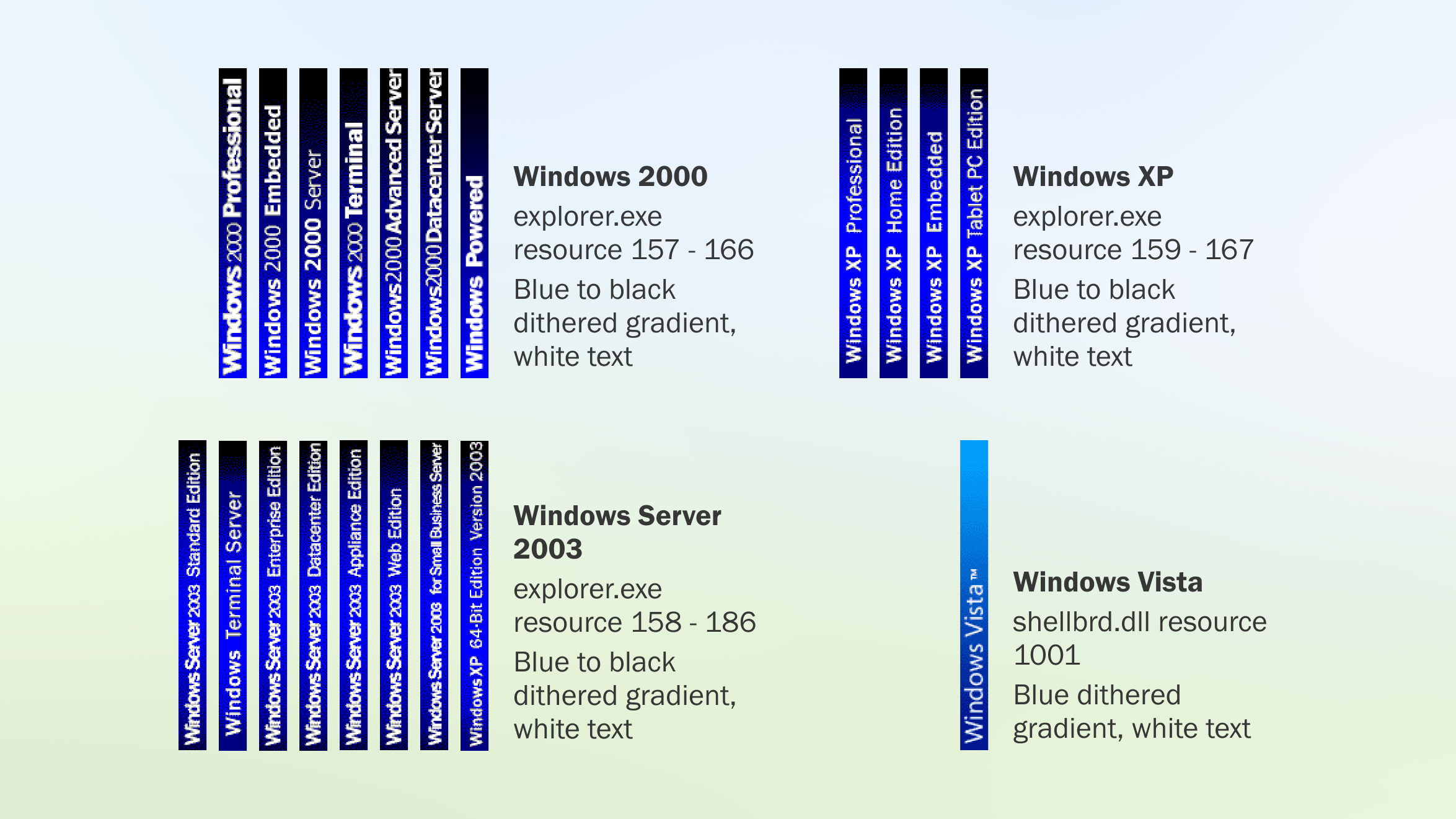
<p>And if we go past NT 4, to 2000, XP, Server 2003, and Vista (the classic Start menu was removed in Windows 7), we can also see that the banner is a bitmap:</p>

<figure>
<img src="/content/images/2024-07-24-windows-2000-xp-vista-start-menu-watermarks.png" alt="Image displaying a significant number of Start menu banners in the above mentioned Windows releases, for the many different editions released. Vista only has one banner universal to all editions." />
</figure>

<p>Ok, that’s a lot of editions (and I didn’t even include all editions of XP). Maybe they decided rendering with GDI at runtime didn’t make sense, so they went back to bitmaps.</p>

<p>The two key claims Dave makes about NT 4.0 are:</p>

<ul>
  <li>NT 4.0 comes in many editions, so there are already multiple brand names to consider.</li>
  <li>Each language release of NT 4.0 needs its name localised.</li>
</ul>

<p>Starting with the first claim, we can easily confirm that it appears to be incorrect.</p>

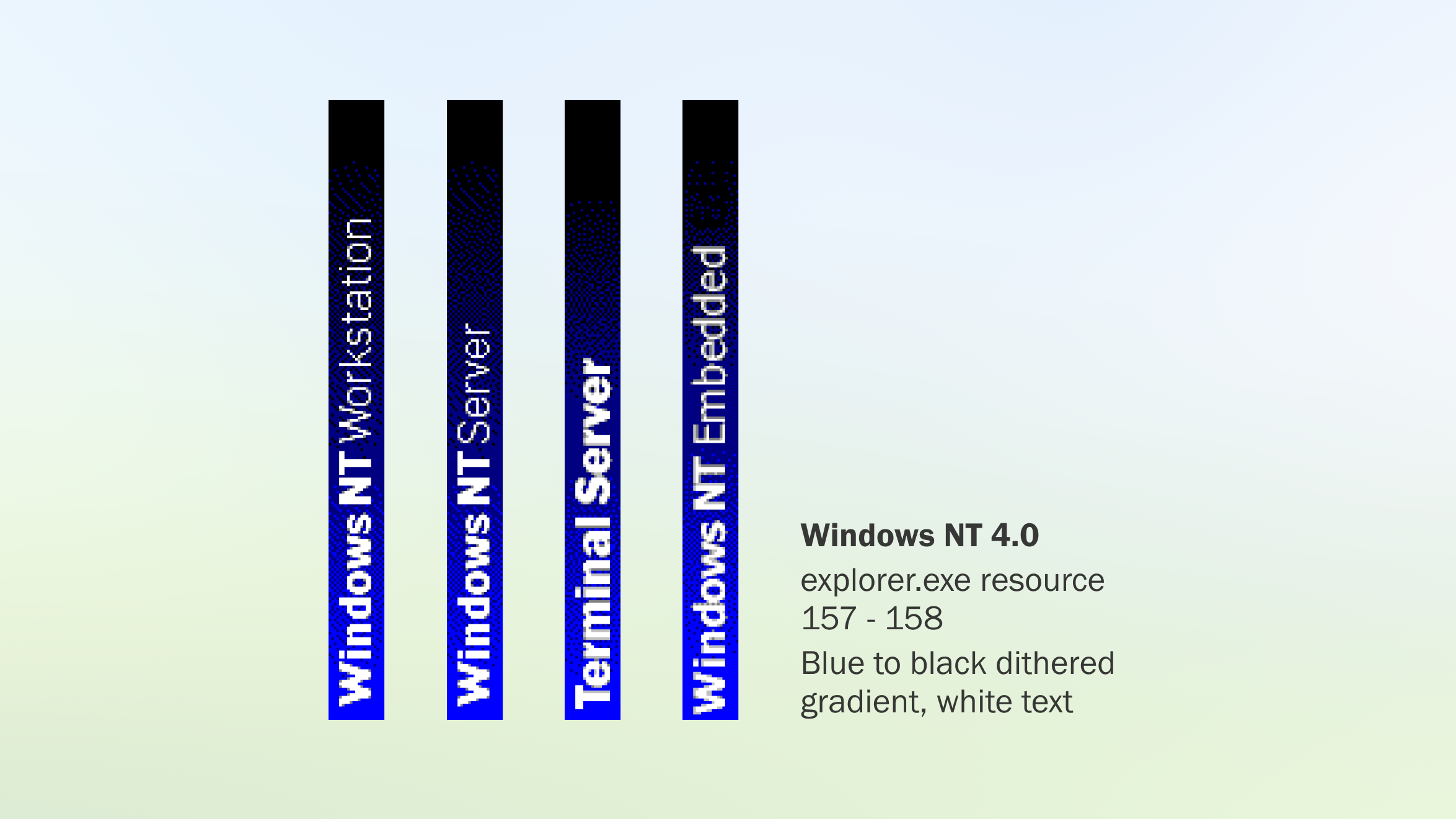
<p>The final release of NT 4.0 (and all service packs) only contains two banners: Workstation, and Server. There are also two later releases of NT 4.0 - Terminal Server and Embedded. Terminal Server simply overwrites the Server resource with the Terminal Server name, and Embedded adds a new resource. Amusingly, “Embedded” seems to have two nearly invisible letters: “Ed”. Maybe it was originally “Embedded Edition”?</p>

<figure>
<img src="/content/images/2024-07-24-windows-nt-4-start-menu-watermarks.png" alt="Image displaying the four variants of the Windows NT 4.0 Start menu banner" />
</figure>

<p>Well, this still just doesn’t seem right. There must be some situation where the bitmaps are ignored, and a graphic rendered at runtime is used instead.</p>

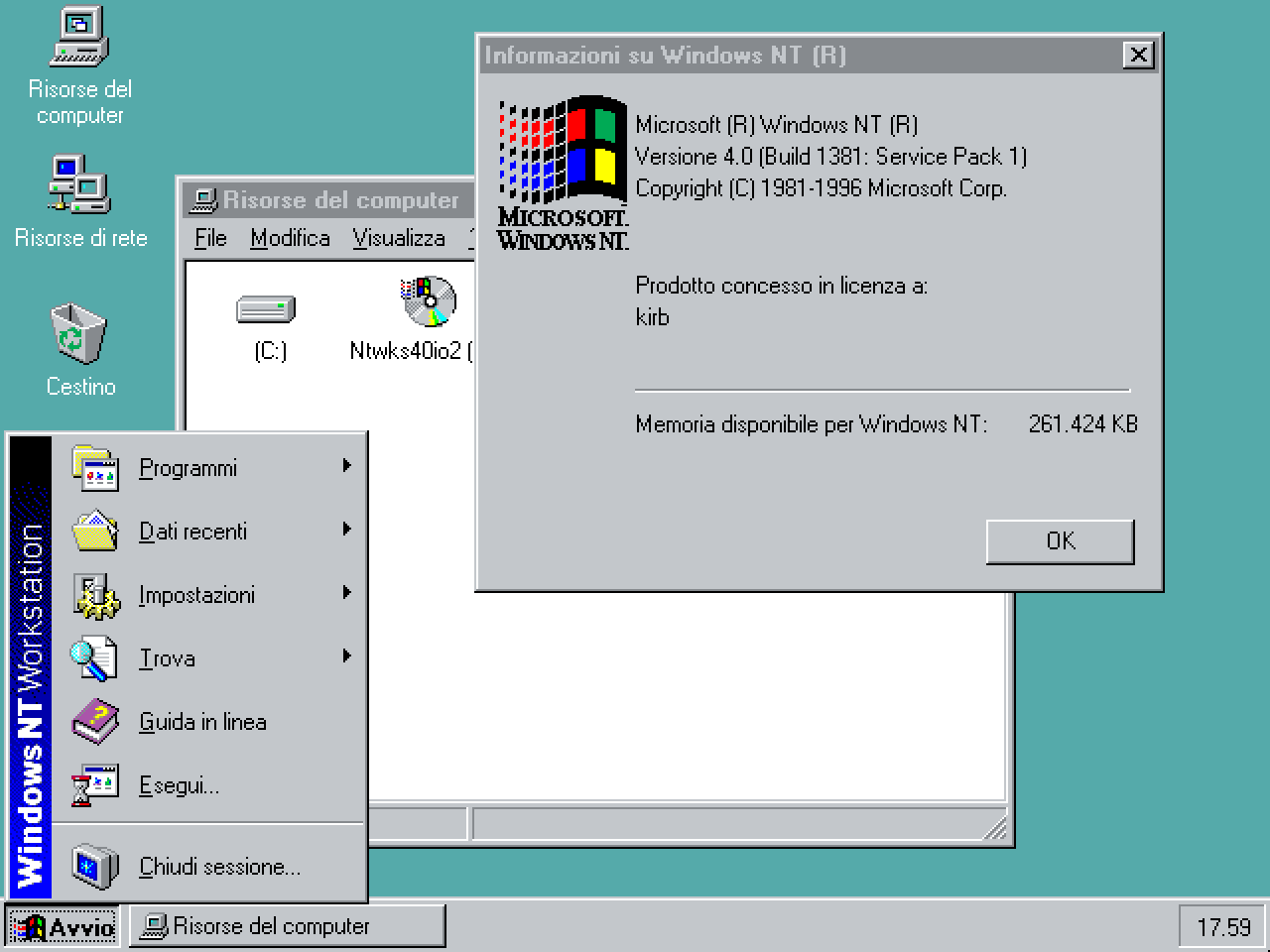
<p>I poked at a copy of Windows NT 4.0 Workstation in Italian, and found the exact same bitmaps with English text. Maybe the bitmaps are just there for some compatibility reason?</p>

<p>So I installed this copy, and found the exact same English-language bitmaps.</p>

<figure>
<img src="/content/images/2024-07-24-windows-nt-4-workstation-italian.png" alt="Screenshot of the Windows NT 4.0 Workstation desktop, Start menu, and About Windows dialog in Italian" />
</figure>

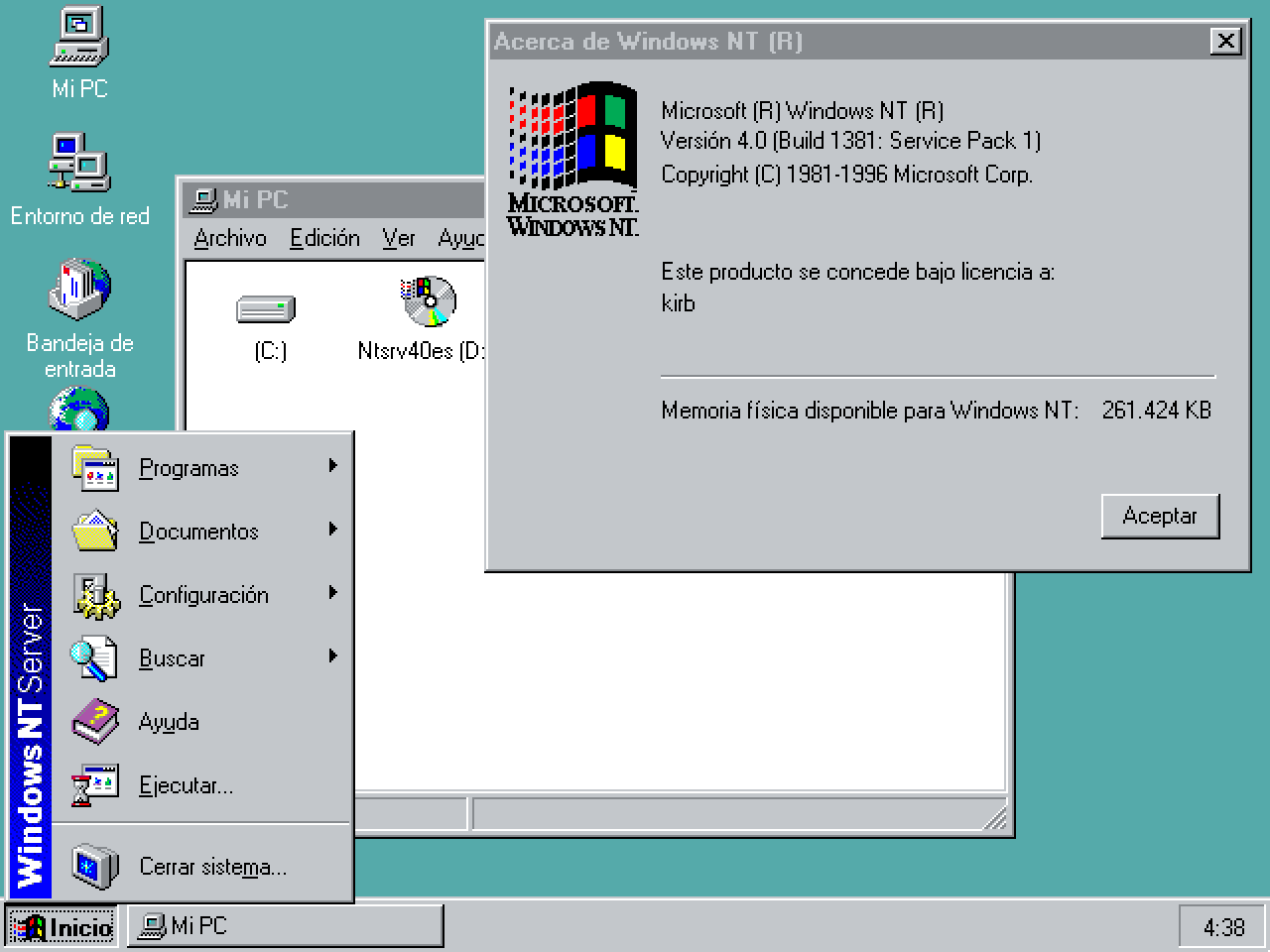
<p>Nope - the branding stays identical. What about Server in Spanish?</p>

<figure>
<img src="/content/images/2024-07-24-windows-nt-4-server-spanish.png" alt="Same screenshot as above, in Spanish for Windows NT 4.0 Server" />
</figure>

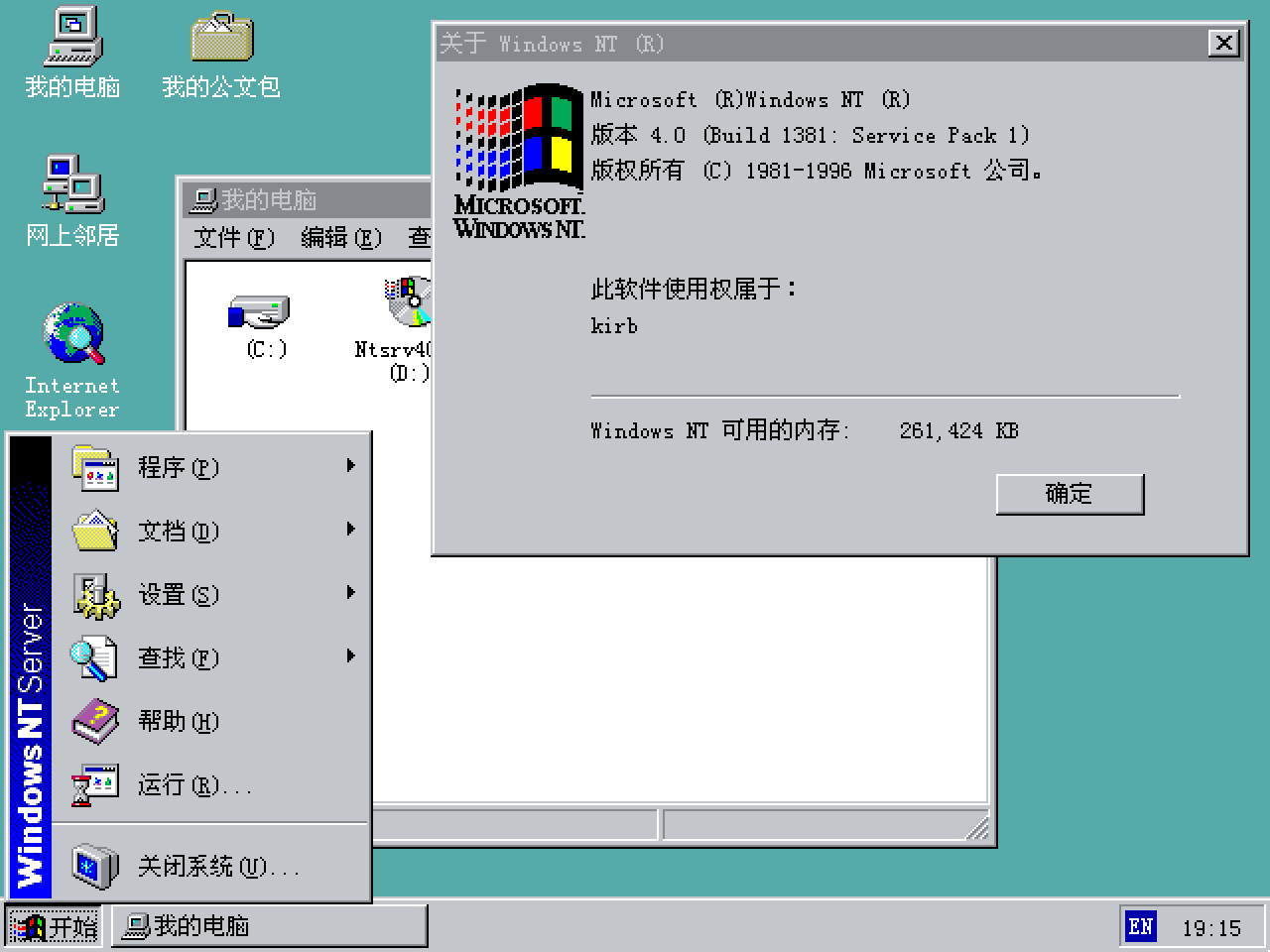
<p>Hm. English and other European languages were part of the initial release of NT 4.0. Chinese, Japanese, and Korean (CJK) were released later. Maybe it was added later to handle those languages. So let’s try Simplified Chinese Server.</p>

<figure>
<img src="/content/images/2024-07-24-windows-nt-4-server-simplified-chinese.png" alt="Same screenshot as above, in Simplified Chinese" />
</figure>

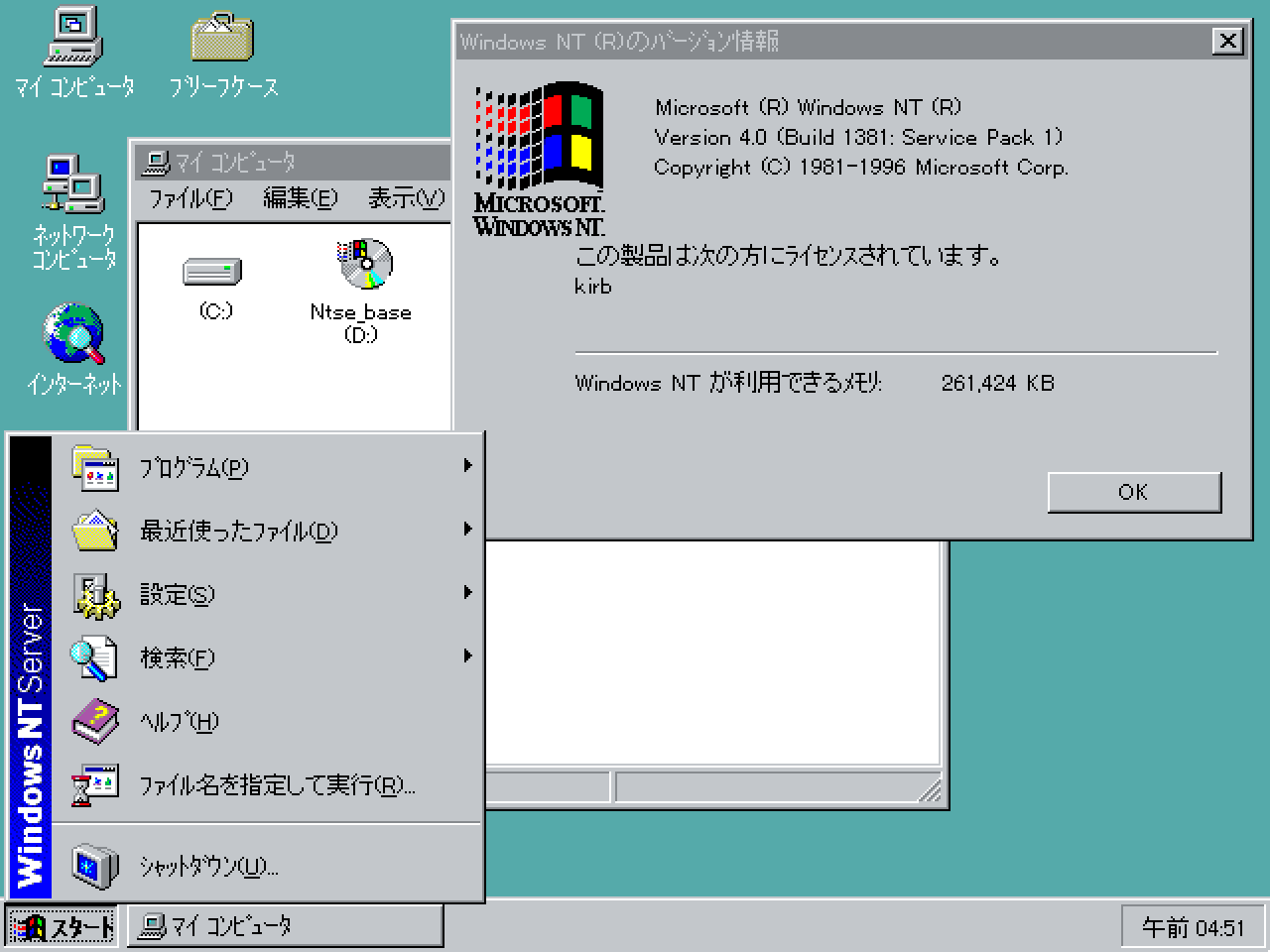
<p>Let’s go for broke then - Japanese Enterprise Server.</p>

<figure>
<img src="/content/images/2024-07-24-windows-nt-4-enterprise-server-japanese.png" alt="Same screenshot as above, in Japanese for Windows NT 4.0 Enterprise Server" />
</figure>

<p>At this point we’ve confirmed that, in released builds of NT 4.0, the Windows branding doesn’t change with localisation, in fact rarely changes with the specific edition of the operating system, and no procedural rendering is being done.</p>

<p>That leaves one more theory - was the bitmap <em>originally</em> procedurally generated in NT 4.0 betas, and then, later, it became the two Workstation and Server bitmap resources?</p>

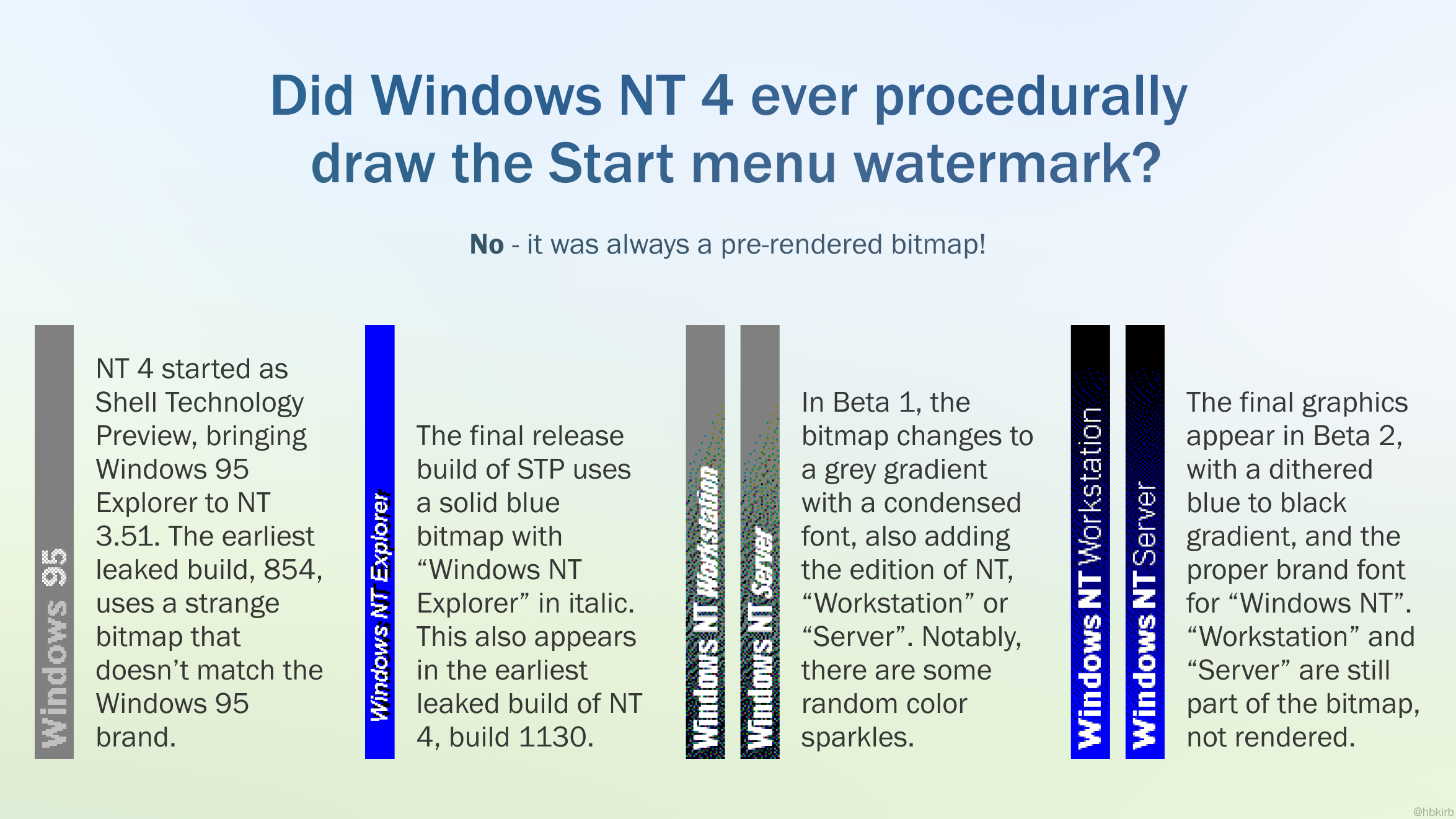
<p>Let’s turn back the clock to the development of Windows 95, the first time the Start menu, taskbar, and Explorer (the “shell”) were implemented in a capacity more than just a proof-of-concept. Alongside the MS-DOS-based versions of Windows, Microsoft were simultaneously working on Windows NT. There was some clear excitement for the Windows 95 redesign, and therefore demand for it to make its way to Windows NT. The project porting the Windows 95 shell to NT was named the Shell Update Release (SUR), and it was released as Windows NT 4.0. Microsoft also developed and released the <a href="https://en.wikipedia.org/wiki/Windows_NT_3.51#NewShell">Shell Technology Preview</a> (aka NewShell), allowing an early build of the port to be tested on NT 3.51.</p>

<p>In the earliest leaked build of the Shell Technology Preview, <a href="https://betawiki.net/wiki/Windows_NT_3.51_build_854">3.50.854</a>, the banner says “Windows 95” on a grey background, almost identically to the banner found in Windows 95, but in what appears to be a Helvetica-alike font such as Microsoft Sans Serif, rather than the Franklin Gothic font used by the Windows brand between 95 and XP. By the time STP reaches its official preview release (of which two builds were released), the graphic is changed to say “Windows NT Explorer” on a bright blue background.</p>

<p>This NT Explorer graphic also appears in <a href="https://betawiki.net/wiki/Windows_NT_4.0_build_1130">early leaked pre-beta builds</a> of NT 4.0. In Beta 1, the bitmap changes to a grey gradient with a condensed font, also adding the edition of NT, “Workstation” or “Server”. It also has some random color sparkles. The final graphics appear in Beta 2, with a dithered blue to black gradient, and the correct brand font for “Windows NT”.</p>

<figure>
<img src="/content/images/2024-07-24-windows-nt-4-beta-watermarks.png" alt="Image displaying the lineage of the Start menu banner in the development of Windows NT 4.0.
Did Windows NT 4 ever procedurally draw the Start menu banner?
No - it was always a pre-rendered bitmap!
NT 4 started as Shell Technology Preview, bringing Windows 95 Explorer to NT 3.51. The earliest leaked build, 854, uses a strange bitmap that doesn’t match the Windows 95 brand.
The final release build of STP uses a solid blue bitmap with “Windows NT Explorer” in italic. This also appears in the earliest leaked build of NT
4, build 1130.
In Beta 1, the bitmap changes to a grey gradient with a condensed font, also adding the edition of NT, “Workstation” or “Server”. Notably, there are some random color sparkles.
The final graphics appear in Beta 2, with a dithered blue to black gradient, and the proper brand font for “Windows NT”. “Workstation” and “Server” are still part of the bitmap, not rendered." />
</figure>

<p>Finally, leaked source code of presumably RTM or a post-RTM release of NT 4.0 does not appear to contain any code to render the banners with GDI. The only code that has been found simply loads the bitmap resource for Workstation or Server.</p>

<blockquote class="twitter-tweet"><p lang="en" dir="ltr">Preliminary glance at NT 4 source code seems to confirm <a href="https://t.co/dweshpCivD">pic.twitter.com/dweshpCivD</a></p>&mdash; Rafael Rivera (@WithinRafael) <a href="https://twitter.com/WithinRafael/status/1813310669875499223">July 16, 2024</a></blockquote>
<script async="" src="https://platform.twitter.com/widgets.js" charset="utf-8"></script>

<p><strong>In conclusion: From publicly available evidence, it does not appear that, at any point, Windows NT 4.0 ever used a procedurally rendered graphic.</strong></p>

<p>So was Dave lying, did he just forget how it works, or is there more to the story we don’t know? Well, of course, it’s hard to tell. In one way, the SUR project was at least 29 years ago, with the earliest known Shell Technology Preview build being from November 1994, and I can definitely see memory failing to recall how it was put together all that long ago. In another, I’ve observed Dave to have an interesting way of describing his achievements, where it seems like some of it is truth, and some of it is embellished. This does feel a bit like it could be one of those, but again, all I can do is speculate. He’s had some clear contributions to Windows that, in my opinion, need no embellishment because they’re significant enough that millions of users have interfaced with them, and many still exist in the latest version of Windows 11 today, despite him leaving Microsoft in 2003. And indeed, Dave himself frequently mentions on social media that he is wealthy, published a book literally titled “Secrets of the Autistic Millionaire”, and closes his videos by saying he’s “just in it for the subs and likes”. There is also the possibility that the code never saw the light of day - never released, and never leaked.</p>

<p>I performed this exercise to understand whether, perhaps, something was missing from Dave’s story, or we were unaware of some necessary condition to invoke the procedurally-drawn graphic code path. With all of the above said, <em>please do not harass Dave over this post.</em> Unless he has some evidence we don’t, or that I missed, I don’t think it’s necessary to bug him.</p>]]></content><author><name>Adam Demasi</name></author><summary type="html"><![CDATA[Who knew a Windows brand banner could be so controversial?]]></summary><media:thumbnail xmlns:media="http://search.yahoo.com/mrss/" url="https://adamdemasi.com/content/images/2024-07-24-windows-nt-4-beta-watermarks.png" /><media:content medium="image" url="https://adamdemasi.com/content/images/2024-07-24-windows-nt-4-beta-watermarks.png" xmlns:media="http://search.yahoo.com/mrss/" /></entry><entry><title type="html">Features controlled by iOS 17.4’s eligibility system</title><link href="https://adamdemasi.com/2024/04/23/ios-eligibility-features.html" rel="alternate" type="text/html" title="Features controlled by iOS 17.4’s eligibility system" /><published>2024-04-23T02:00:00+00:00</published><updated>2024-04-23T02:00:00+00:00</updated><id>https://adamdemasi.com/2024/04/23/ios-eligibility-features</id><content type="html" xml:base="https://adamdemasi.com/2024/04/23/ios-eligibility-features.html"><![CDATA[<p><strong>With massive thanks to <a href="https://twitter.com/plzdonthaxme">plzdonthaxme</a> for helping with research, we now know most of what’s going on with Apple’s feature eligibility system.</strong></p>

<p>As a quick recap: The eligibility system works with a file on Apple’s servers that tells iOS which conditions must be met for a country-specific feature to be enabled. They can change this file at any time, and all active iOS devices should apply the update within a few days.</p>

<p>You can visit <a href="https://theapplewiki.com/wiki/Eligibility">The Apple Wiki article about Eligibility</a> for the most current (and detailed) info, but here’s a summary of what we found:</p>

<p>Unless I specifically call it out, all of these features are iPhone-only, and the country requirement applies to both your physical location, and your Apple ID’s country setting.</p>

<h2 id="app-marketplaces">App marketplaces</h2>

<p>If iOS determines you’re in the European Union, you can <a href="/2024/04/19/app-marketplace-experience.html">install app marketplaces</a> (3rd-party app stores), and install apps offered in them. Or, coming in iOS 17.5, you can install apps <a href="https://developer.apple.com/support/web-distribution-eu/">directly from the web</a>.</p>

<p>If you leave the EU, or sign into a non-EU Apple ID, you receive updates to these apps for a grace period of up to 30 days. After that, you stop receiving updates, and can’t reinstall either, including if you’re running low on space and iOS automatically offloads it (cloud icon next to the name on the home screen).</p>

<p>Apple confirmed in <a href="https://www.theverge.com/2024/3/7/24093437/apple-iphone-third-party-app-store-dma-eu">statements to the media</a> that apps still open after the grace period expires – they just can’t be updated or reinstalled. Apps downloaded from the web do update automatically, by the way, because it’s still all Apple’s App Store infrastructure behind the scenes.</p>

<h2 id="web-browsers">Web browsers</h2>

<p>If you’re in the EU, you can install variants of browsers that use their own rendering/JavaScript engines, rather than Safari’s WebKit and JavaScriptCore. The app needs to be a separate app from the worldwide version of the app, which still must use WebKit/JavaScriptCore. (Mozilla has <a href="https://www.theverge.com/2024/1/26/24052067/mozilla-apple-ios-browser-rules-firefox">spoken out</a> on why this is problematic.)</p>

<p>Like with app marketplaces, you have a grace period of 30 days after leaving the EU before browsers with their own engine stop updating or reinstalling.</p>

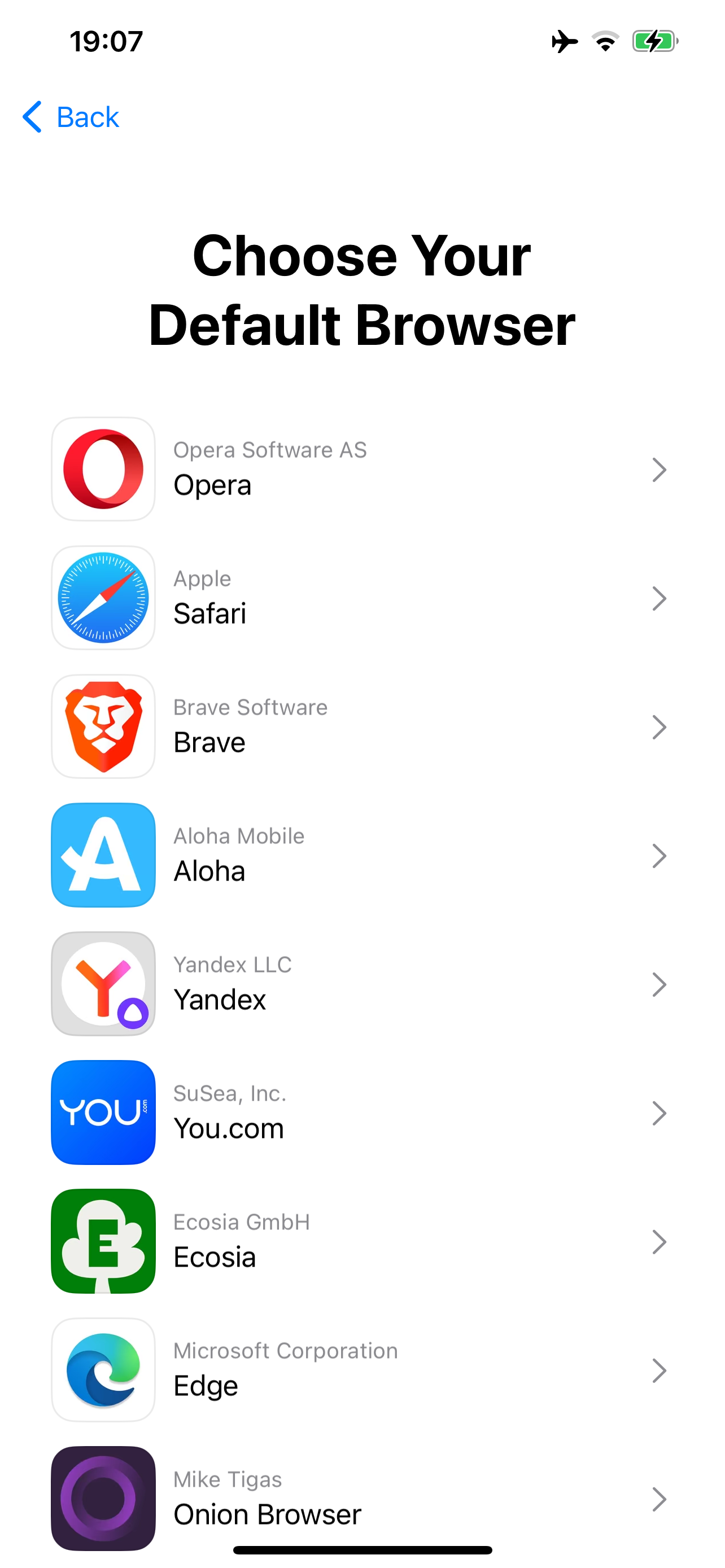
<p>You’ll also be prompted to choose a browser the first time you open Safari.</p>

<figure>
<img src="/content/images/2024-04-23-browser-choice.png" alt="A full-screen prompt in Safari: Choose Your Default Browser. It lists several browsers you can install, Safari being one of them. (The list is randomly sorted to avoid bias.)" style="max-width: 400px;" />
</figure>

<h2 id="pwas-home-screen-web-apps">PWAs (home screen web apps)</h2>

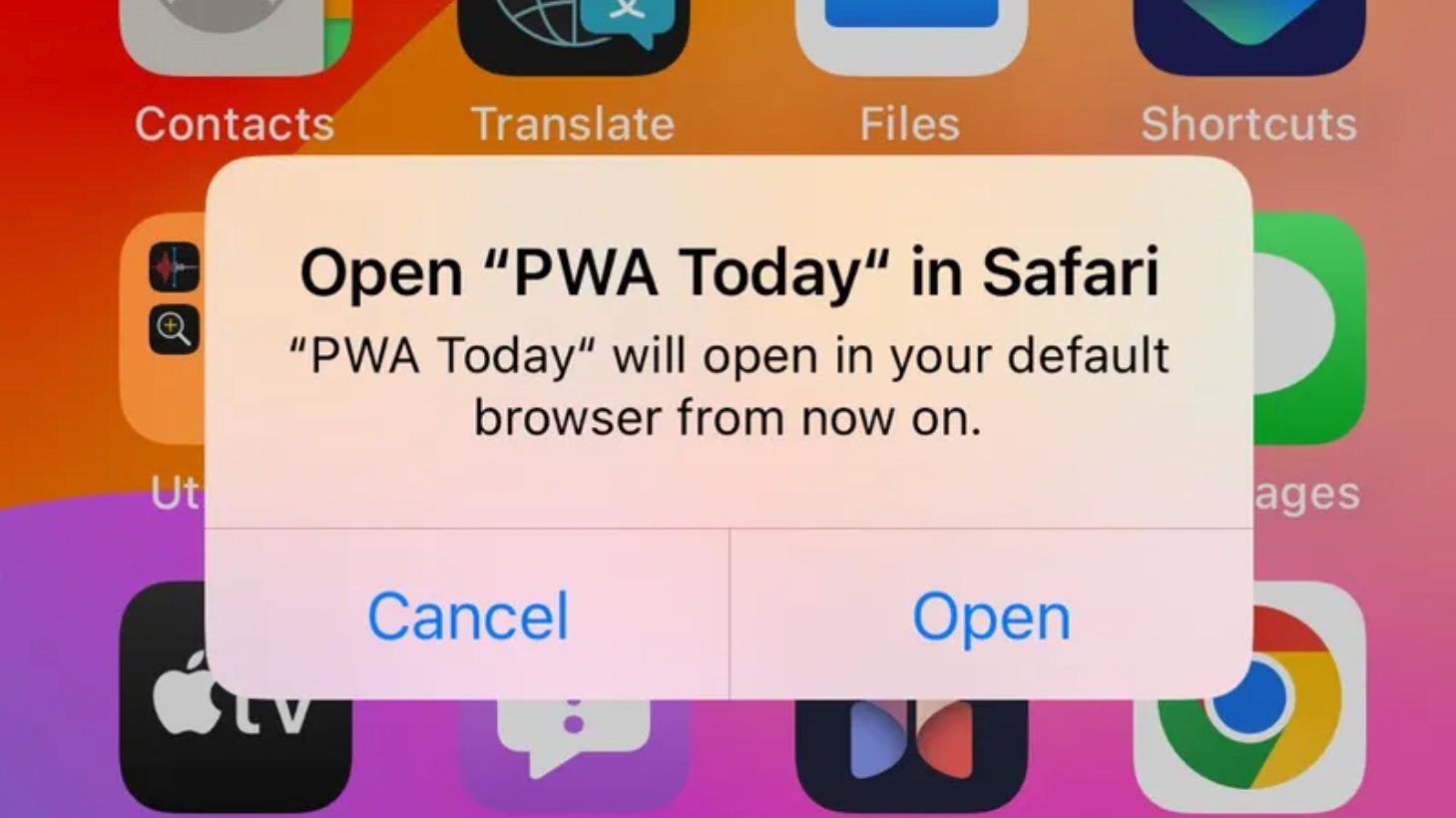
<p>Apple <a href="https://www.theverge.com/2024/2/15/24074182/apple-drops-support-iphone-web-apps-eu-dma">caused a stink</a> during the 17.4 betas because web apps added to the home screen (<a href="https://en.wikipedia.org/wiki/Progressive_web_app">Progressive Web Apps</a>) would display a message stating they now open in your default web browser, instead of running in a full-screen app experience. This meant you lost cookies and other data you stored in the app (I heard of crypto wallet apps as one of the scariest examples – you couldn’t even transfer your data across to Safari!), and lost other features Safari locks to home screen apps to prevent abuse, such as push notifications. Apple swears this was due to them having a time constraint to release 17.4, but the DMA was signed into law in 2022, so they had plenty of time. Delaying to the last minute isn’t a good excuse 🤷‍♀️</p>

<figure>
<img src="/content/images/2024-04-23-pwa-opens-in-safari.png" alt="A prompt on the home screen: Open “PWA Today” in Safari “PWA Today” will open in your default browser from now on." style="max-width: 400px;" />
<figcaption>
    <p>Screenshot from <a href="https://open-web-advocacy.org/blog/apple-on-course-to-break-all-web-apps-in-eu-within-20-days/">Open Web Advocacy</a></p>
  </figcaption>
</figure>

<p>Anyway, it seems this either was, or is now after the backlash, controlled by a remote toggle. This is the only one that <em>disables</em> something, rather than enabling. It’s currently set to nothing, so home screen web apps are enabled worldwide. The code for disabling them is probably still there, meaning it can be toggled back on at any time. I doubt they will, but the mechanism is there regardless.</p>

<h2 id="contactless-payments">Contactless payments</h2>

<p>Moving to the European Economic Area now (the EU plus 🇮🇸 Iceland, 🇱🇮 Liechtenstein, and 🇳🇴 Norway). Users in the EEA have the option to use payment apps that can perform <a href="https://developer.apple.com/support/hce-payment-transactions-in-payment-apps/">Host Card Emulation (HCE)</a>, which means your iPhone can act as a credit card to a payment terminal. In less technical words, apps can exist that compete with Apple Pay for in-person payments. They also have the option to become the default app launched when you double-click the side button, instead of Wallet/Apple Pay.</p>

<p>If you leave the EEA, you immediately revert to Apple Pay, and can’t use 3rd-party payment apps.</p>

<h2 id="external-purchase-links">External purchase links</h2>

<p>Apps can take you to a website to make purchases, rather than using the App Store In-App Purchase (IAP) system, in a number of countries:</p>

<ul>
  <li><strong>🇪🇺 EU:</strong> Allowed on iPhone only. (<a href="https://developer.apple.com/support/apps-using-alternative-payment-providers-in-the-eu/">Apple documentation</a>)</li>
  <li><strong>🇮🇸 🇱🇮 🇳🇴 Iceland, Liechtenstein, Norway:</strong> Allowed on iPhone and iPad if you’re physically in one of these countries, and your billing address is also set to one of them, or, for some reason, 🇦🇹 Austria.</li>
  <li><strong>🇺🇸 US:</strong> Allowed on iPhone or iPad if your Apple ID billing address is set to the US. (<a href="https://developer.apple.com/support/storekit-external-entitlement-us/">Apple documentation</a>)</li>
  <li><strong>🇷🇺 Russia:</strong> Allowed on iPhone and iPad if your billing address is set to Russia.</li>
</ul>

<p>This permission remains active for a grace period of 30 days after you no longer meet any of these requirements.</p>

<h2 id="3rd-party-billing">3rd-party billing</h2>

<p>In some countries, you can make an IAP purchase through a 3rd-party payment provider, without leaving the app:</p>

<ul>
  <li><strong>🇪🇺 EU:</strong> Allowed on iPhone only. (<a href="https://developer.apple.com/support/apps-using-alternative-payment-providers-in-the-eu/">Apple documentation</a>)</li>
  <li><strong>🇰🇷 South Korea:</strong> Allowed on iPhone or iPad. (<a href="https://developer.apple.com/support/storekit-external-entitlement-kr">Apple documentation</a>)</li>
</ul>

<p>South Korean apps must go through one of the following payment providers: KCP, Inicis, Toss, or NICE. Each app that wants to use 3rd-party billing needs to opt into the feature, and release separate versions of their app for South Korean and/or EU users.</p>

<p>This permission also remains active for 30 days after you no longer meet the requirements.</p>

<h2 id="china-geopolitics">China geopolitics</h2>

<p>An Apple system for country-specific features wouldn’t be complete without some curious Chinese geopolitical tweaks. There are already a number of things that differ on iOS if you have an iPhone whose model number ends in “CH” (that’s China in Apple’s model region system, not Switzerland). A new one introduced in iOS 17.4 changes the names of Hong Kong, Macao, and Taiwan across the operating system to include a “(China)” suffix if you have a China-region iPhone.</p>

<p>This one was more interesting to look into, because it was built as a patch to an open-source component, International Components for Unicode (ICU), which is used by basically all modern software on the planet. It handles things like displaying the correct date and time format, currency format, and specific to this case, country/language names translated to every language. What happened here is Apple made a patch that isn’t tied to the Chinese language, but rather whether the device is China-region. The patch code is publicly released in macOS 14.4’s open-source components. The engineer added an amusingly misleading comment explaining that it’s so China displays as “China mainland” when it appears next to Hong Kong, Macao, or Taiwan. Another part of the patch, where the country names are defined in each language, adds the “(China)” suffix when the code forces the “%prc” variant to be used.</p>

<div class="language-cpp highlighter-rouge"><div class="highlight"><pre class="highlight"><code><span class="cp">#if APPLE_ICU_CHANGES
</span><span class="c1">// rdar://115264744 (Sub-TLF: China geopolitical location display via ICU)</span>
<span class="kt">bool</span> <span class="n">useChineseVariant</span> <span class="o">=</span> <span class="n">uaprv_onCalciumDevice</span><span class="p">();</span>
<span class="k">if</span> <span class="p">(</span><span class="n">useChineseVariant</span> <span class="o">&amp;&amp;</span> <span class="n">uprv_strcmp</span><span class="p">(</span><span class="n">region</span><span class="p">,</span> <span class="s">"CN"</span><span class="p">)</span> <span class="o">==</span> <span class="mi">0</span><span class="p">)</span> <span class="p">{</span>
    <span class="c1">// if the region code is CN, the regular display name is "China mainland" and the "%prc" variant</span>
    <span class="c1">// is "China".  On a China-SKU device, we want "China mainland" when CN appears in a list along</span>
    <span class="c1">// with TW. HK, and/or MO, and "China" the rest of the time.  We use</span>
    <span class="c1">// UDISPCTX_CAPITALIZATION_FOR_UI_LIST_OR_MENU as the mechanism to tell us when to say "China mainland".</span>
    <span class="k">if</span> <span class="p">(</span><span class="n">capitalizationContext</span> <span class="o">==</span> <span class="n">UDISPCTX_CAPITALIZATION_FOR_UI_LIST_OR_MENU</span><span class="p">)</span> <span class="p">{</span>
        <span class="n">useChineseVariant</span> <span class="o">=</span> <span class="nb">false</span><span class="p">;</span>
    <span class="p">}</span>
<span class="p">}</span>
<span class="cp">#endif // APPLE_ICU_CHANGES
</span></code></pre></div></div>

<p>You can see this patch <a href="https://github.com/apple-oss-distributions/ICU/blob/de296b44597bf6855343b5b1e527886240deb0f8/icuSources/common/locdspnm.cpp#L920-L953">here</a> and <a href="https://github.com/apple-oss-distributions/ICU/blob/de296b44597bf6855343b5b1e527886240deb0f8/icuSources/data/region/en.txt#L302-L307">here</a>.</p>

<p>That’s all we know for now. There are some eligibility domains that we haven’t figured out yet, but it’s likely because they’re not implemented yet. This is the bulk of it, though.</p>

<blockquote>
  <p>This post is based on a tweet I <a href="https://twitter.com/hbkirb/status/1782742542561525857">originally posted on Twitter</a>.</p>

  <p>See also my previous post about <a href="/2024/04/20/ios-eligibility.html">how the eligibility system works</a>, and <a href="/2024/04/19/app-marketplace-experience.html">iOS 17.4’s flawed app marketplace installation flow</a>.</p>
</blockquote>]]></content><author><name>Adam Demasi</name></author><summary type="html"><![CDATA[App stores, browsers, payments, and China.]]></summary><media:thumbnail xmlns:media="http://search.yahoo.com/mrss/" url="https://adamdemasi.com/content/images/2024-04-23-browser-choice.png" /><media:content medium="image" url="https://adamdemasi.com/content/images/2024-04-23-browser-choice.png" xmlns:media="http://search.yahoo.com/mrss/" /></entry><entry><title type="html">How I tricked iOS into giving me EU DMA features</title><link href="https://adamdemasi.com/2024/04/20/ios-eligibility.html" rel="alternate" type="text/html" title="How I tricked iOS into giving me EU DMA features" /><published>2024-04-20T02:00:00+00:00</published><updated>2024-04-20T02:00:00+00:00</updated><id>https://adamdemasi.com/2024/04/20/ios-eligibility</id><content type="html" xml:base="https://adamdemasi.com/2024/04/20/ios-eligibility.html"><![CDATA[<p><strong>I’m in Australia, but as far as my iPhone knows, I’m in Italy. How?</strong></p>

<p>In iOS 17.4, Apple introduced a new system called <a href="https://theapplewiki.com/wiki/Filesystem:/usr/libexec/eligibilityd">eligibilityd</a>. This works with <a href="https://theapplewiki.com/wiki/Filesystem:/usr/libexec/countryd">countryd</a> (which you might have heard about when it <a href="https://9to5mac.com/2023/04/25/ios-16-restrict-features-based-on-location/">first appeared in iOS 16.2</a>) and the Apple ID system to decide where you physically are. The idea is that multiple sources need to agree on where you are, before giving you access to features such as those mandated by the <a href="https://en.wikipedia.org/wiki/Digital_Markets_Act">Digital Markets Act</a>.</p>

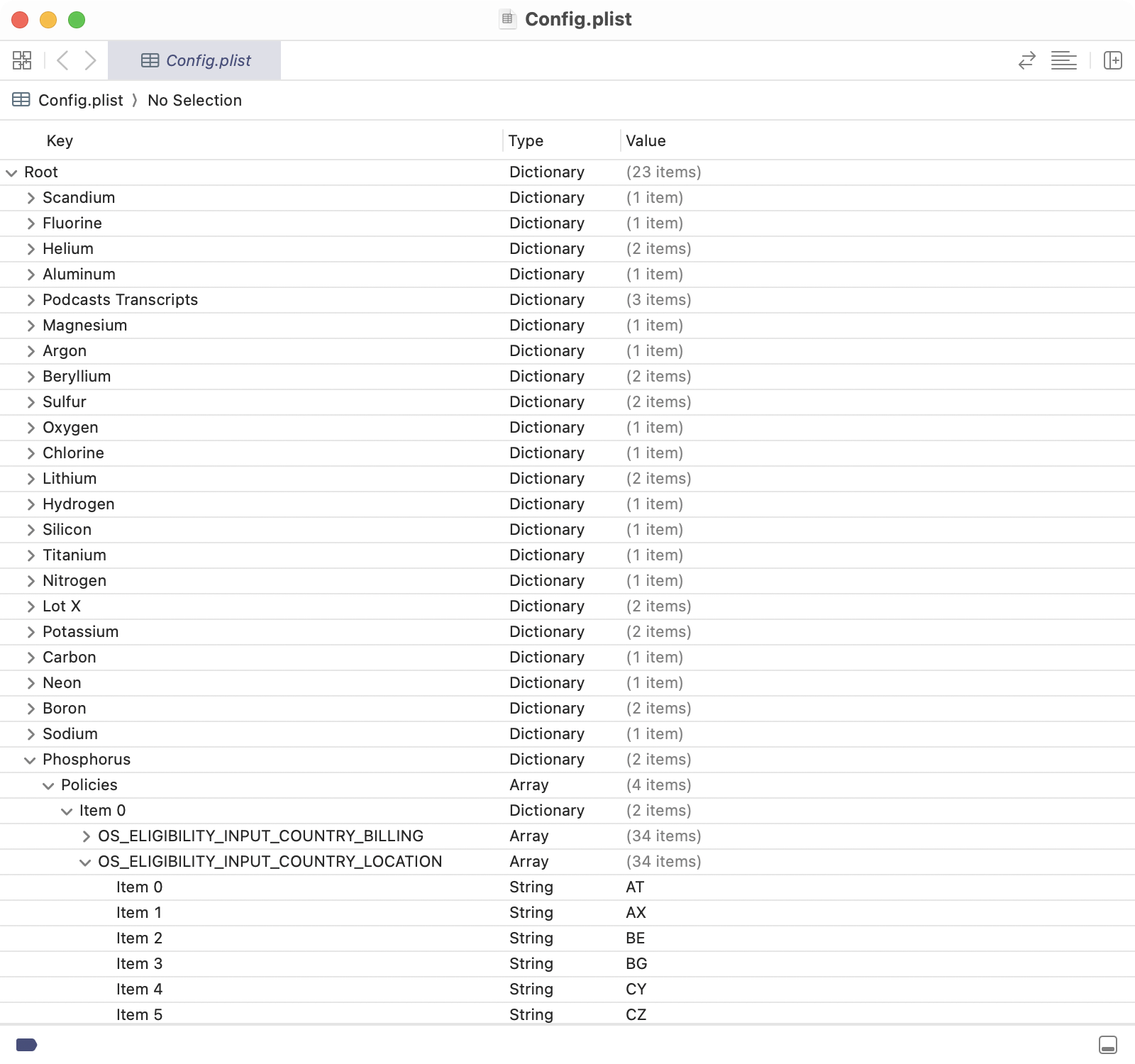
<p>A plist file downloaded from Apple declares “domains”, which are individual features locked behind a location wall. At the time of writing, there are 24 (although one is missing), and the file was last updated on the 5th of April. We weren’t tracking updates to it before this week, so I don’t know what changed exactly. As a reminder, iOS 17.4 launched on the 5th of March, and was in beta from the 30th of January.</p>

<figure>
<img src="/content/images/2024-04-20-oseligibility-config.png" alt="Screenshot of a file called Config.plist open in Xcode. It shows 23 items, which are the first 22 elements on the periodic table, plus “Lot X” and “Podcasts Transcripts”. Phosphorus is expanded to show an array named Policies. It has a sub-key named OS_ELIGIBILITY_INPUT_COUNTRY_LOCATION, with 34 two-character country codes underneath it. (It’s one short because Calcium is missing.)" />
</figure>

<p>Probably to obscure what they are, these domains are named after the chemical elements corresponding to their numeric value. The only way to determine what feature these correspond to is by disassembling the relevant parts of iOS that check the eligibility system. On The Apple Wiki’s <a href="https://theapplewiki.com/wiki/Eligibility">Eligibility</a> article, I’ve documented what I’ve already found.</p>

<p>Most domains are currently configured to only be allowed on iPhone, because the DMA has only declared Apple a gatekeeper with phones, not tablets. So much for all the laptop-class hardware the iPad Pro gets if it doesn’t get laptop-class software features the iPhone does get…</p>

<p>Apple has the ability to push an update to this config file at any time, whether to roll out a feature to more countries, to enable features on iPad, or to withdraw the feature from some or all countries. The update would likely be installed on all active iPhones within a few days.</p>

<p>I’m working through figuring out what each of the domains are. See <a href="https://theapplewiki.com/wiki/Eligibility">the Apple Wiki article</a> for the most current table.</p>

<p>So knowing all this, how did I trick iOS into giving me the DMA features? Well, I took my old 12 Pro Max and started tinkering around. I reset the phone, disabled Location Services, inserted an Italian SIM from my holiday many years ago, and made a new Italian Apple ID. No good.</p>

<p>I then set up a pfSense Wi-Fi router, broadcasting itself as having a regulatory country of Italy. (I compared the regulations, there are a bunch of differences for 5 GHz, so I disabled it. Otherwise, the EU’s Wi-Fi regulations are stricter than Australia’s, so it’s safe.) Well, looking at the device’s logs, countryd still knew I was in Australia, even after erasing and setting up the phone again.</p>

<p>The last thing I tried was going downstairs to our basement, where there’s no mobile signal. Reset the phone again, and what do you know, as soon as I open Safari it asks me to choose a browser. I put the phone in airplane mode so I can go back upstairs. As far as I can tell, it still believes I’m in Italy. It’s not just the 30 day grace period Apple provides - in fact, that grace period only applies to four of the 24 domains.</p>

<p>I don’t know how much of what I did was necessary (at minimum, the VPN is likely not needed), but this phone is obviously not practical to use in this state. It needs to stay in airplane mode, and needs a Wi-Fi network configured to present itself as having an EU regulatory country. It’s really only a setup I can use for testing EU features.</p>

<p>Again, I’m still actively researching this. Check the <a href="https://theapplewiki.com/wiki/Eligibility">eligibility article</a> to see the most current information I have.</p>

<blockquote>
  <p>This post is based on a tweet I <a href="https://twitter.com/hbkirb/status/1781503147904741430">originally posted on Twitter</a>.</p>

  <p>See also my previous post about <a href="/2024/04/19/app-marketplace-experience.html">iOS 17.4’s flawed app marketplace installation flow</a>, and the next post, <a href="/2024/04/23/ios-eligibility-features.html">Features controlled by iOS 17.4’s eligibility system</a>.</p>
</blockquote>]]></content><author><name>Adam Demasi</name></author><summary type="html"><![CDATA[The iOS 17.4 feature eligibility system.]]></summary><media:thumbnail xmlns:media="http://search.yahoo.com/mrss/" url="https://adamdemasi.com/content/images/2024-04-20-oseligibility-config.png" /><media:content medium="image" url="https://adamdemasi.com/content/images/2024-04-20-oseligibility-config.png" xmlns:media="http://search.yahoo.com/mrss/" /></entry><entry><title type="html">The iOS 17.4 app marketplace flow is a disaster</title><link href="https://adamdemasi.com/2024/04/19/app-marketplace-experience.html" rel="alternate" type="text/html" title="The iOS 17.4 app marketplace flow is a disaster" /><published>2024-04-19T04:40:00+00:00</published><updated>2024-04-19T04:40:00+00:00</updated><id>https://adamdemasi.com/2024/04/19/app-marketplace-experience</id><content type="html" xml:base="https://adamdemasi.com/2024/04/19/app-marketplace-experience.html"><![CDATA[<p>The iOS 17.4 app marketplace flow is a disaster. While AltStore seems to have some problems itself (mostly due to a payment system that seems rushed), the majority of the problems are in Apple’s implementation.</p>

<p>App installation has no progress prompts. The <a href="https://developer.apple.com/documentation/appdistribution/enabling-alternative-distribution-app-installation-in-a-browser"><code class="language-plaintext highlighter-rouge">app-marketplace://</code> URL scheme</a>, used by websites to tell iOS to begin installing a marketplace app, displays zero progress. It only has the ability to display error messages, such as telling you you’re not eligible (not located in the EU), or that you need to go to Settings to allow the app to be installed. Naturally, there’s no button that takes you to Settings, nor any explanation of what you do when you’re there.</p>

<figure>
<img src="/content/images/2024-04-19-marketplace-not-eligible.png" alt="Alert on top of the home screen: Can’t Install “AltStore PAL”
You’re not eligible to install new apps from “altstore.io”. Buttons: [Learn More] [OK]" style="max-width: 400px;" />
</figure>

<p>Let’s follow the process of being in an <a href="/2024/04/20/ios-eligibility.html">eligible</a> country (currently being any in the European Union), though.</p>

<figure>
<img src="/content/images/2024-04-19-marketplace-not-allowed.png" alt="Alert on top of the AltStore website: Marketplace Installation Your installation settings on this iPhone don’t allow marketplaces by “AltStore, LLC” to be installed from the web. You can change this in Settings. Buttons: [Learn More] [OK]" style="max-width: 400px;" />
</figure>

<p>In both prompts, the “Learn More” button takes you to <a href="https://support.apple.com/117767">this Apple Support article</a>.</p>

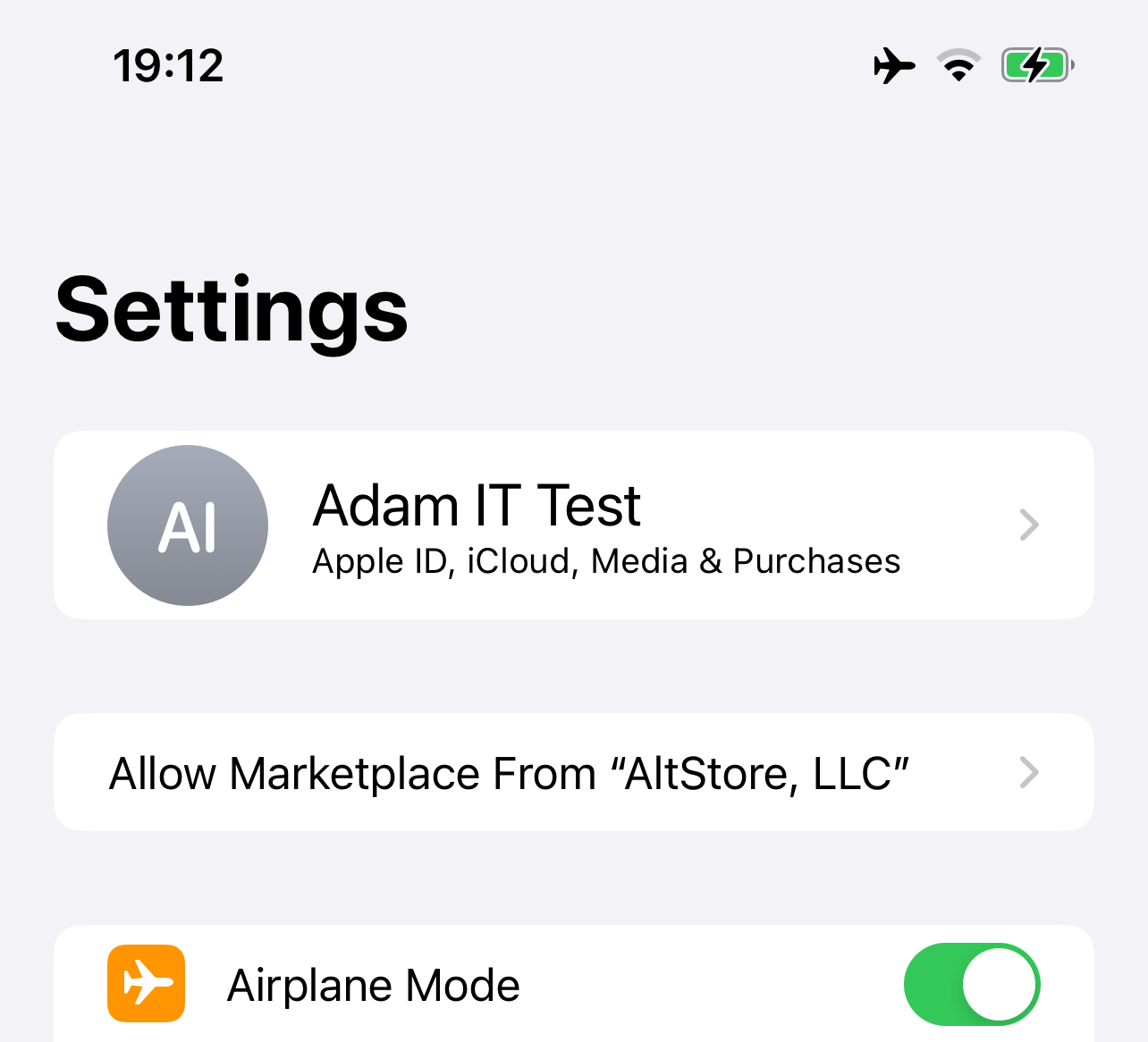
<p>Once you’re in Settings, a followup button appears below your Apple ID name.</p>

<figure>
<img src="/content/images/2024-04-19-marketplace-followup.png" alt="A button has appeared in the iOS Settings app, below the Apple ID button. It says: Allow Marketplace From “AltStore, LLC”" style="max-width: 400px;" />
</figure>

<p>Tapping it displays this full-screen prompt:</p>

<figure>
<img src="/content/images/2024-04-19-marketplace-allow.png" alt="A full-screen prompt in Settings: Allow Marketplace From “AltStore, LLC” You attempted to install “AltStore PAL” from “altstore.io”. Your device settings don't allow marketplaces to be installed by the developer “AltStore, LLC” from the web. Learn more… App Installation: By allowing this developer, you will be able to install their marketplaces on your iPhone. Your Data: Any installed marketplaces will be managed by the developer and may give them access to your data. Unavailable Features: Your App Store account, stored payment method, and related features, such as subscription management and refund requests, will not be available. Buttons: [Allow] [Ignore] both with a neutral grey background" style="max-width: 400px;" />
</figure>

<p>Tapping Allow simply dismisses the prompt. There’s no indication of what happens next. The answer is - nothing happens. You need to go back to Safari and initiate the installation again. Then, you get another full-screen prompt, and then an alert prompt to confirm you’re really sure.</p>

<figure>
<img src="/content/images/2024-04-19-marketplace-install.png" alt="A full-screen prompt in Safari: “altstore.io” Would Like to Install an App Marketplace Any downloads, updates and purchases made on this marketplace will be managed by the developer “AltStore, LLC”. Verify the information below before installing. Learn more… There is then a description and screenshots of the app, followed by buttons: [Install App Marketplace] with blue background, [Cancel] with neutral blue text. On top of it, an alert saying Confirm App Marketplace Installation For purchases made on this marketplace, your stored App Store payment method and related features, such as subscription management and refund requests, will not be available. Buttons: [Cancel] [Continue]" style="max-width: 400px;" />
</figure>

<p>The app then starts downloading, but nothing tells you that. Tapping the download button does nothing now. You just eventually think to go to the home screen and find the app.</p>

<p>The only way to understand what is actually going on is to watch the <a href="https://theapplewiki.com/wiki/System_Log">syslog</a> of the device - which it should go without saying is not something intended for users to look at anyway.</p>

<figure>
<img src="/content/images/2024-04-19-altstore-installed.png" alt="The AltStore icon is now on the home screen." style="max-width: 400px;" />
</figure>

<p>Awesome, we finally got there! Uh, almost. Now you found an app you’d like to install from the marketplace, so you do so. You then get another full-screen prompt like the one above.</p>

<figure>
<img src="/content/images/2024-04-19-install-delta.png" alt="A full-screen prompt in AltStore: “AltStore” Would Like to Install an App Updates and purchases in this app will be managed by “AltStore”. Verify the information below before installing. Learn more… There is then a description and screenshots of the app, followed by buttons: [Install App] with blue background, [Cancel] with neutral blue text" style="max-width: 400px;" />
</figure>

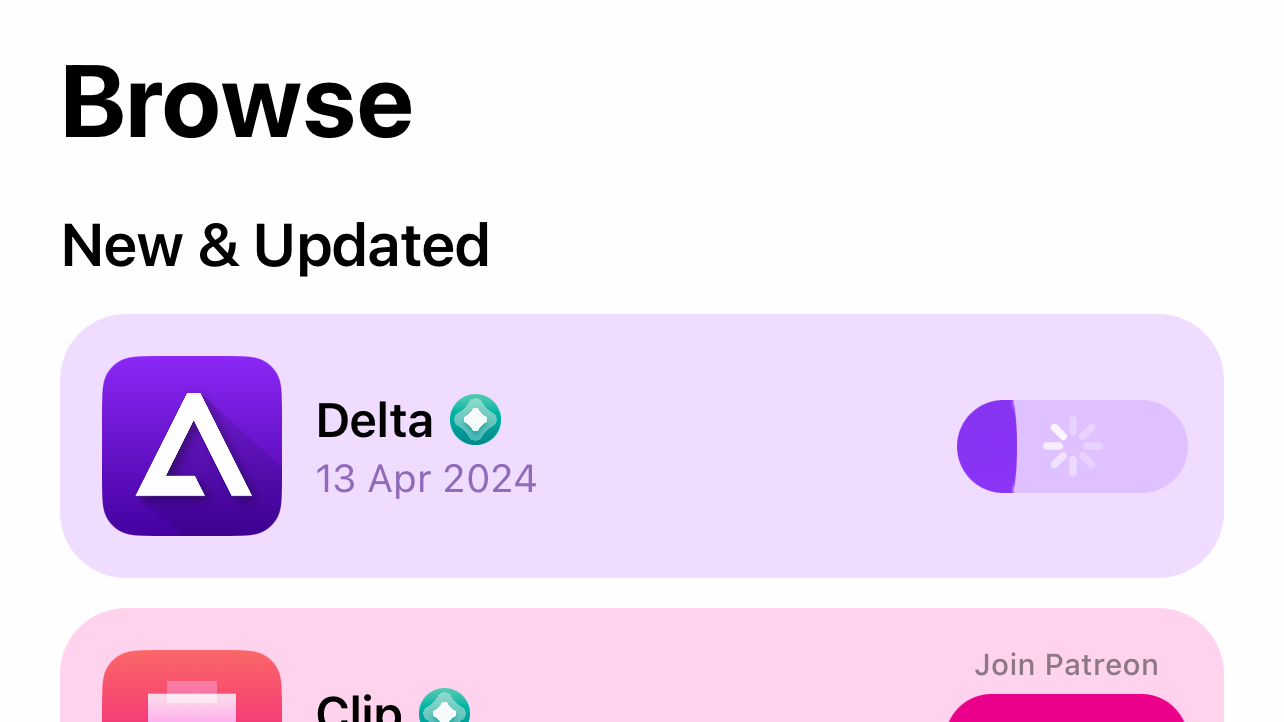
<p>To AltStore’s credit, I was using a slow VPN into the EU, so I don’t know if the lack of progress indication for the first few seconds is their fault or mine. But eventually it shows a progress bar.</p>

<figure>
<img src="/content/images/2024-04-19-delta-installing.png" alt="A progress bar appears next to Delta in the AltStore UI, showing that it is being installed." style="max-width: 400px;" />
</figure>

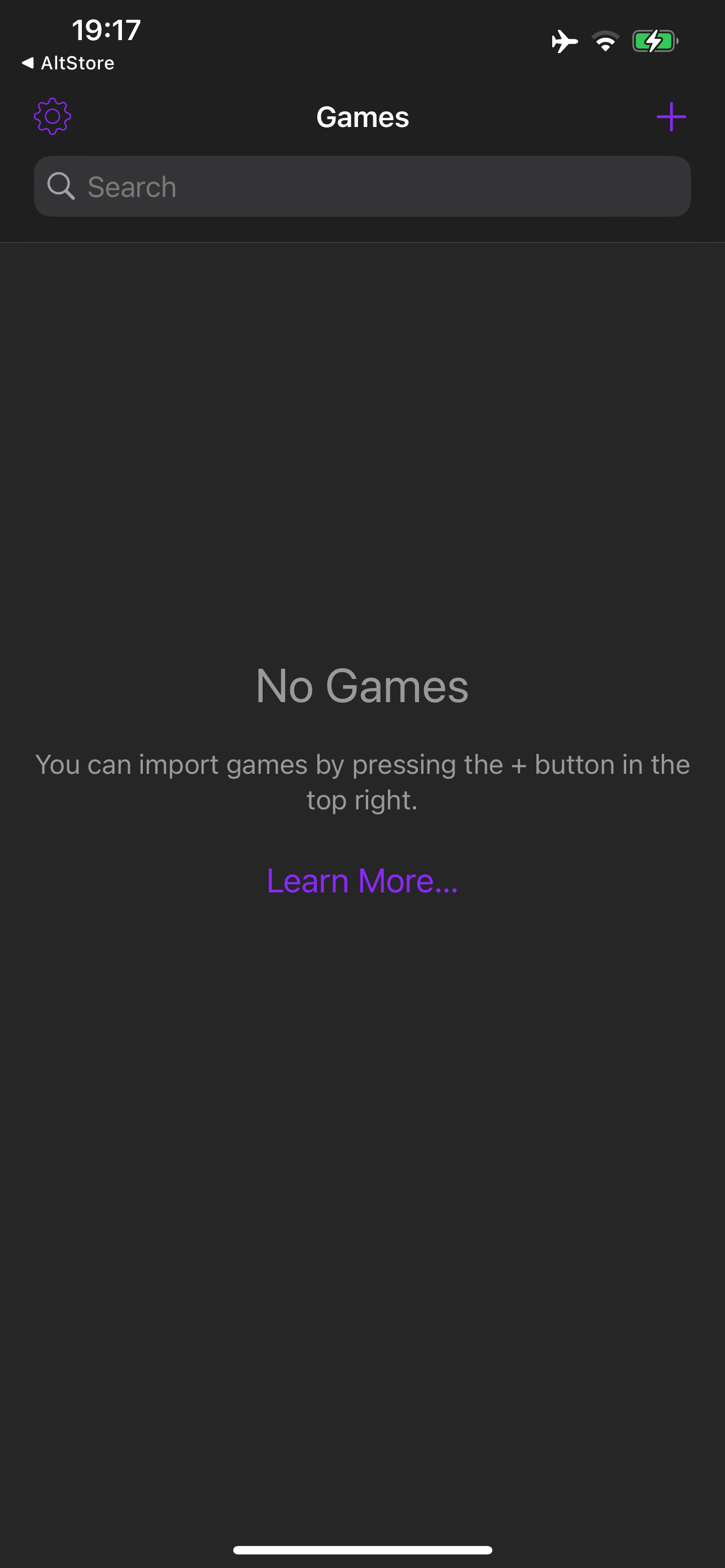
<p>I hit what I hope is a bug in AltStore, where I’ve uninstalled Delta, but it still thinks it’s installed, so I couldn’t get a screenshot of the app installing from the home screen. However, it does indeed display progress there, as confirmed by others who have posted about their experience.</p>

<figure>
<img src="/content/images/2024-04-19-delta-installed.png" alt="Delta app opened to its initial “No Games” screen." style="max-width: 400px;" />
</figure>

<p>Finally, the app is installed! We got there eventually.</p>

<p>This goes back to me being conflicted about where we’re at with this. I both don’t like AltStore working with Apple as if to show that we’re ok with this solution, but also, it is important to show how bad Apple’s solution really is.</p>

<p>Make no mistake, if a teenager was able to build <a href="https://theapplewiki.com/wiki/Saffron">a jailbreak</a> that <a href="https://youtu.be/IFdPkUiBHhM">puts a Cydia icon on the home screen</a> with a download progress bar back on iOS 4.3 (2011!), Apple can do far better with user experience here. They know what they’re doing. The sloppiness of the whole process is intentional, and AltStore needing to charge €1.50/year is a barrier Apple fully intended to force upon marketplaces.</p>

<p>My bet is that Apple will use the shortcomings to argue to authorities that hey, look, nobody’s using this. Users hate it, the only positive user experience is our App Store. Could you drop the regulations and lawsuits, pretty please?</p>

<blockquote>
  <p>This post is based on a tweet I <a href="https://twitter.com/hbkirb/status/1781180942406869070">originally posted on Twitter</a>. I updated some of this based on information I learned later on, such as that some duplicated confirmation popups were in fact from AltStore, and I would imagine are remnants of its sideloaded version that will be cleaned up soon. This post is a review of iOS 17.4’s app marketplace functionality, not a review of AltStore, so I decided to remove those parts.</p>

  <p>I also followed up this post with a <a href="/2024/04/20/ios-eligibility.html">look into the feature eligibility system</a>, and a <a href="/2024/04/23/ios-eligibility-features.html">list of features controlled by the system</a>.</p>
</blockquote>]]></content><author><name>Adam Demasi</name></author><summary type="html"><![CDATA[Maliciously compliant.]]></summary><media:thumbnail xmlns:media="http://search.yahoo.com/mrss/" url="https://adamdemasi.com/content/images/2024-04-29-marketplace-not-eligible.png" /><media:content medium="image" url="https://adamdemasi.com/content/images/2024-04-29-marketplace-not-eligible.png" xmlns:media="http://search.yahoo.com/mrss/" /></entry><entry><title type="html">Swift snippet: Get the SF Symbols icon for the user’s Mac</title><link href="https://adamdemasi.com/2023/04/15/mac-device-icon-by-device-class.html" rel="alternate" type="text/html" title="Swift snippet: Get the SF Symbols icon for the user’s Mac" /><published>2023-04-15T22:11:00+00:00</published><updated>2023-04-15T22:11:00+00:00</updated><id>https://adamdemasi.com/2023/04/15/mac-device-icon-by-device-class</id><content type="html" xml:base="https://adamdemasi.com/2023/04/15/mac-device-icon-by-device-class.html"><![CDATA[<p>Starting with the Mac Studio, and continuing with the 2022 and 2023 MacBook Air/Pro, Mac mini, Mac Studio, and Mac Pro, Macs no longer have identifying model names like <a href="https://theapplewiki.com/wiki/List_of_MacBook_Pros#2020"><code class="language-plaintext highlighter-rouge">MacBookPro16,2</code></a> or <a href="https://theapplewiki.com/wiki/IMac_(27-inch,_Late_2013)"><code class="language-plaintext highlighter-rouge">iMac14,2</code></a>. Instead, they’re now something like <a href="https://theapplewiki.com/wiki/MacBook_Pro_(14-inch,_2023)"><code class="language-plaintext highlighter-rouge">Mac14,9</code></a>. Using a simple prefix check to figure out which “class” of Mac the app is running on no longer works.</p>

<p>As a new solution, you can query <a href="https://developer.apple.com/documentation/uniformtypeidentifiers">UniformTypeIdentifiers</a>, which holds a comprehensive taxonomy of all PowerPC, Intel, and Apple Silicon Macs released up to the point of the running macOS version. The upside is also that you can find tons of other information on the device, such as the visual design, which works great for picking the right SF Symbol.</p>

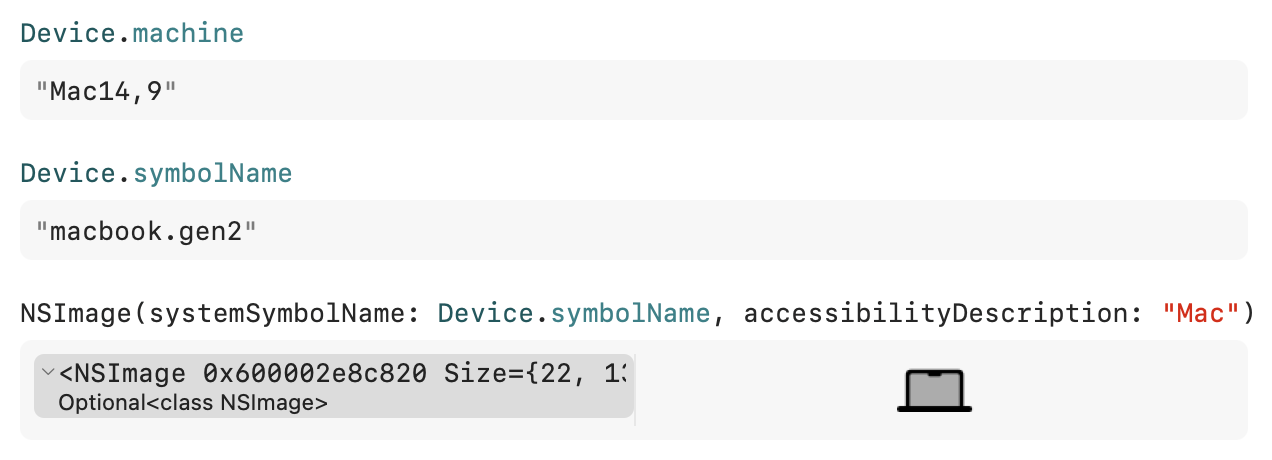
<p>Here is the result of the below code on my 14″ MacBook Pro with M2 Pro:</p>

<figure>
<img src="/content/images/2023-04-16-mac-device-icon-demo.png" alt="Swift Playgrounds screenshot: Device.machine returning Mac14,9, Device.symbolName returning macbook.gen2" />
</figure>

<p>Really unfortunately, nothing similar seems to exist on iOS. It would have been great to have this considering we now have three major hardware designs (home bar, home button, dynamic island) to worry about.</p>

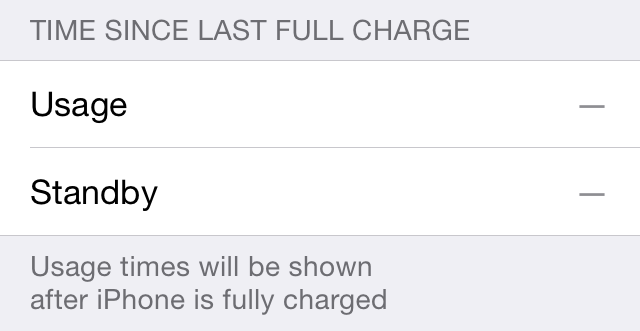
<script src="https://gist.github.com/kirb/5f7870b99c9ebf6c2201f9500cbdd766.js"></script>]]></content><author><name>Adam Demasi</name></author><summary type="html"><![CDATA[Apple made things worse so we could make them better.]]></summary><media:thumbnail xmlns:media="http://search.yahoo.com/mrss/" url="https://adamdemasi.com/content/images/2023-04-16-mac-device-icon-demo.png" /><media:content medium="image" url="https://adamdemasi.com/content/images/2023-04-16-mac-device-icon-demo.png" xmlns:media="http://search.yahoo.com/mrss/" /></entry><entry><title type="html">Doing a respring the right way: Following up</title><link href="https://adamdemasi.com/2019/08/25/respring-the-right-way-followup.html" rel="alternate" type="text/html" title="Doing a respring the right way: Following up" /><published>2019-08-25T04:07:00+00:00</published><updated>2019-08-25T04:07:00+00:00</updated><id>https://adamdemasi.com/2019/08/25/respring-the-right-way-followup</id><content type="html" xml:base="https://adamdemasi.com/2019/08/25/respring-the-right-way-followup.html"><![CDATA[<p>Respringing the “right way” allows SpringBoard to save battery usage data. Otherwise, the standby/usage times are lost and display useless “–” values until you fully charge again.</p>

<figure>
<img src="/content/images/2019-08-25-empty-usage-stats.png" alt="Time Since Last Full Charge: Usage times will be shown after iPhone is fully charged" />
</figure>

<p>I originally wrote about this <a href="/2013/08/04/respring-the-right-way.html">way back in 2013</a>. What changed since then?</p>

<p>Well, seemingly everything!</p>

<hr />

<p>In iOS 8.0, FrontBoard was introduced. Many of SpringBoard’s responsibilities were shifted from SpringBoard itself to the FrontBoard framework, allowing Apple to share SpringBoard code with watchOS and tvOS (which use their own Boards), <a href="/2018/06/07/iosmac-research.html">even macOS</a>. One of the responsibilities of FrontBoard is handling shutting down/restarting the device, and relaunching the system app (SpringBoard in this case).</p>

<p>The <code class="language-plaintext highlighter-rouge">-[SpringBoard _relaunchSpringBoardNow]</code> method recommended in the 2013 post did still remain for some time, but was finally removed with iOS 9.3.</p>

<p>The code isn’t as fun-looking as the old way, but it does give you a super useful feature – you can have it automatically unlock after the restart and open a URL. This is especially really convenient if you’re adding a respring button to your preference bundle (please don’t require a respring to update settings if you can avoid it, but when you do, use this!).</p>

<div class="language-objc highlighter-rouge"><div class="highlight"><pre class="highlight"><code><span class="n">NSURL</span> <span class="o">*</span><span class="n">relaunchURL</span> <span class="o">=</span> <span class="p">[</span><span class="n">NSURL</span> <span class="nf">URLWithString</span><span class="p">:</span><span class="s">@"prefs:root=MyTweak"</span><span class="p">];</span> <span class="c1">// use a nil relaunch URL to return to the lock screen</span>
<span class="n">SBSRelaunchAction</span> <span class="o">*</span><span class="n">restartAction</span> <span class="o">=</span> <span class="p">[</span><span class="n">SBSRelaunchAction</span> <span class="nf">actionWithReason</span><span class="p">:</span><span class="s">@"RestartRenderServer"</span> <span class="nf">options</span><span class="p">:</span><span class="n">SBSRelaunchActionOptionsFadeToBlackTransition</span> <span class="n">targetURL</span><span class="o">:</span><span class="n">relaunchURL</span><span class="p">];</span>
<span class="p">[[</span><span class="n">FBSSystemService</span> <span class="nf">sharedService</span><span class="p">]</span> <span class="nf">sendActions</span><span class="p">:[</span><span class="n">NSSet</span> <span class="nf">setWithObject</span><span class="p">:</span><span class="n">restartAction</span><span class="p">]</span> <span class="nf">withResult</span><span class="p">:</span><span class="nb">nil</span><span class="p">];</span>
</code></pre></div></div>

<p>If you need to support iOS versions between 8.0 – 9.2, you can perform checks and use the previous incarnation of the relaunch action.</p>

<div class="language-objc highlighter-rouge"><div class="highlight"><pre class="highlight"><code><span class="n">NSURL</span> <span class="o">*</span><span class="n">relaunchURL</span> <span class="o">=</span> <span class="p">[</span><span class="n">NSURL</span> <span class="nf">URLWithString</span><span class="p">:</span><span class="s">@"prefs:root=MyTweak"</span><span class="p">];</span> <span class="c1">// use a nil relaunch URL to return to the lock screen</span>
<span class="n">SBSRelaunchAction</span> <span class="o">*</span><span class="n">restartAction</span><span class="p">;</span>

<span class="k">if</span> <span class="p">(</span><span class="o">%</span><span class="n">c</span><span class="p">(</span><span class="n">SBSRelaunchAction</span><span class="p">))</span> <span class="p">{</span> <span class="c1">// 9.3+</span>
  <span class="n">restartAction</span> <span class="o">=</span> <span class="p">[</span><span class="o">%</span><span class="n">c</span><span class="p">(</span><span class="n">SBSRelaunchAction</span><span class="p">)</span> <span class="nf">actionWithReason</span><span class="p">:</span><span class="s">@"RestartRenderServer"</span> <span class="nf">options</span><span class="p">:</span><span class="n">SBSRelaunchActionOptionsFadeToBlackTransition</span> <span class="n">targetURL</span><span class="o">:</span><span class="n">relaunchURL</span><span class="p">];</span>
<span class="p">}</span> <span class="k">else</span> <span class="p">{</span> <span class="c1">// 8.0 – 9.3</span>
  <span class="n">restartAction</span> <span class="o">=</span> <span class="p">[</span><span class="o">%</span><span class="n">c</span><span class="p">(</span><span class="n">SBSRestartRenderServerAction</span><span class="p">)</span> <span class="nf">restartActionWithTargetRelaunchURL</span><span class="p">:</span><span class="n">relaunchURL</span><span class="p">];</span>
<span class="p">}</span>

<span class="p">[[</span><span class="n">FBSSystemService</span> <span class="nf">sharedService</span><span class="p">]</span> <span class="nf">sendActions</span><span class="p">:[</span><span class="n">NSSet</span> <span class="nf">setWithObject</span><span class="p">:</span><span class="n">restartAction</span><span class="p">]</span> <span class="nf">withResult</span><span class="p">:</span><span class="nb">nil</span><span class="p">];</span>
</code></pre></div></div>

<p><strong>This works from any process</strong> that isn’t sandboxed against sending inter-process messages to SpringBoard.</p>

<hr />

<p>You can also use <a href="https://hbang.github.io/libcephei/Classes/HBRespringController.html">HBRespringController</a> from <a href="https://hbang.github.io/libcephei/">Cephei</a> that super-simplifies this and provides a fallback to <code class="language-plaintext highlighter-rouge">_relaunchSpringBoardNow</code> for pre-FrontBoard iOS versions.</p>

<div class="language-objc highlighter-rouge"><div class="highlight"><pre class="highlight"><code><span class="p">[</span><span class="n">HBRespringController</span> <span class="nf">respring</span><span class="p">];</span>
<span class="c1">// or</span>
<span class="p">[</span><span class="n">HBRespringController</span> <span class="nf">respringAndReturnTo</span><span class="p">:[</span><span class="n">NSURL</span> <span class="nf">URLWithString</span><span class="p">:</span><span class="s">@"prefs:root=MyAwesomeTweak"</span><span class="p">]];</span>
</code></pre></div></div>

<p>In a preference bundle, you can subclass from <a href="https://hbang.github.io/libcephei/Classes/HBListController.html#/c:objc(cs)HBListController(im)hb_respringAndReturn:">HBListController</a> to get the action method <code class="language-plaintext highlighter-rouge">hb_respringAndReturn:</code> for use on a PSLinkCell or PSButtonCell. This handles calling HBRespringController for you with a URL pointing to the current settings page. That means the screen will go blank for a few seconds, before returning straight to the very same Settings app screen that was just open. Pretty neat.</p>

<hr />

<p>Finally, there is a third option for iOS 11 and newer. The Electra/Chimera and Elucubratus (included with unc0ver) repositories have a package named UIKit Tools – installed by default – containing a command line tool called <code class="language-plaintext highlighter-rouge">sbreload</code>, that executes the same logic to restart SpringBoard via FrontBoard. It also handles the case that SpringBoard is frozen and needs to be forcefully killed, so it’s ideal for use in scripts. Be aware that Telesphoreo’s (saurik’s) build of <code class="language-plaintext highlighter-rouge">sbreload</code> doesn’t seem to work, so use a different solution when running on iOS 10 or older.</p>

<h2 id="fixing-it-for-good-or-getting-close-to-it-at-least">Fixing it for good (or, getting close to it at least)</h2>
<p>In the original post, I wrote:</p>

<blockquote>
  <p><strong>Can there be a “fix” for tweaks that don’t respring the right way?</strong></p>

  <p>I’m working on it, not a high priority to get it done though.</p>
</blockquote>

<p>The fix I had in mind was to register a <a href="https://developer.apple.com/library/archive/documentation/System/Conceptual/ManPages_iPhoneOS/man3/signal.3.html">signal(3)</a> handler inside SpringBoard for <code class="language-plaintext highlighter-rouge">SIGTERM</code>, a graceful termination where the process is given the opportunity to clean up before terminating, and have it call <code class="language-plaintext highlighter-rouge">_relaunchSpringBoardNow</code> instead. This would allow you to run <code class="language-plaintext highlighter-rouge">killall SpringBoard</code> and retain battery stats. This wasn’t really viable, as a crash (<code class="language-plaintext highlighter-rouge">SIGSEGV</code>, <code class="language-plaintext highlighter-rouge">SIGABRT</code>, etc.), which was inevitable while developing a SpringBoard tweak, would ruin the stats anyway. Overriding those signals with a signal handler is possible, but would tamper with the crash being caught by the crash reporter. It’d also prevent Cydia Substrate from catching the crash so it can set a flag to launch Safe Mode when SpringBoard starts again.</p>

<p>Finally, there are still some tweaks (and people) who kill SpringBoard using <code class="language-plaintext highlighter-rouge">SIGKILL</code>. That usually comes in the form of <code class="language-plaintext highlighter-rouge">killall -9 SpringBoard</code> (9 is the numeric value of <code class="language-plaintext highlighter-rouge">SIGKILL</code>). It may sound like the same thing as <code class="language-plaintext highlighter-rouge">SIGTERM</code> since “kill” and “terminate” are synonyms in the English dictionary, but there’s a very important difference. A terminate signal <em>asks</em> the process to clean up and then exit when it’s ready to do so, while a kill signal instructs the operating system to kill the process, <em>without</em> giving it a chance to run any cleaning-up code. Of course, this means you can’t install a signal(3) handler for <code class="language-plaintext highlighter-rouge">SIGKILL</code> as it’ll never be called.</p>

<p>This made a “fix” seem like a poor idea, as there are still so many ways SpringBoard can exit without activating the fix. At that point I wasn’t able to find any explanation of what made <code class="language-plaintext highlighter-rouge">_relaunchSpringBoardNow</code> so special and why any other method, like the venerable <a href="https://developer.apple.com/library/archive/documentation/System/Conceptual/ManPages_iPhoneOS/man3/exit.3.html">exit(3)</a>, or terminating the main run loop (causing code placed after a <code class="language-plaintext highlighter-rouge">-[NSRunLoop run]</code> call to be executed), wouldn’t activate this mythical SpringBoard termination handler that saved these stats.</p>

<p>The better solution was activism about “the right way”, and the original post I made served that role as it showed up when Googling the right keywords. Later I created HBRespringController to take advantage of Cephei’s popularity and make it a no-brainer to call that handy method to respring correctly regardless of the iOS version it’s running on.</p>

<p>One workaround did get released — <a href="https://github.com/Skylerk99/cyspring">CySpring</a> by Skylerk99. It makes Cydia respring via a call to FrontBoard, rather than by killing its process as Cydia does by default. However, it was never updated after the API changes were made in iOS 9.3, so it doesn’t work today.</p>

<hr />

<p>While CoolStar was re-developing the <a href="https://cydia.saurik.com/package/uikittools/">UIKit Tools</a> project inherited from the ageing Telesphoreo ecosystem to be up-to-date with modern developments to iOS, I brought up a consideration that it includes a tool called <code class="language-plaintext highlighter-rouge">sbreload</code> that doesn’t work. At this point, <code class="language-plaintext highlighter-rouge">sbreload</code> used a <a href="https://git.saurik.com/uikittools.git/blob/68d2b30b8a240347caa0937c75cfbf0079b7a3a5:/sbreload.c">fairly complex looking</a> technique of restarting SpringBoard by manually doing some teardown work and then forcing a full unload and restart of its launch daemon, that presumably worked a long time ago on early versions of iOS/iPhone OS, but definitely doesn’t seem to work now. There may have been some good reason it was developed like this – Cydia used to invoke this tool, but later switched to directly killing SpringBoard. <code class="language-plaintext highlighter-rouge">sbreload</code> on the Electra/Chimera and unc0ver jailbreaks now restarts SpringBoard via FrontBoard, with a fallback to forcefully restart SpringBoard if it seems to be frozen.</p>

<p>Sileo and Zebra now happily use <code class="language-plaintext highlighter-rouge">sbreload</code> to restart SpringBoard, and the fast respring times this brings are thoroughly enjoyed. Hopefully the speed of it encourages tweak developers to find out how it’s done, and leads them to this post. If that’s you, then it looks like I’ve done my job 😊</p>

<hr />

<h2 id="update">Update</h2>
<p>With iOS 12, while developing the Screen Time feature, Apple rewrote a significant amount of crusty code relating to statistics collection. In the process, the long-standing lost battery usage data bug was fixed! It’s now impossible for an incorrect SpringBoard termination to affect battery statistics. Of course, you should still allow SpringBoard to exit gracefully through the specific APIs designed for this job, especially since this allows for a faster SpringBoard restart.</p>]]></content><author><name>Adam Demasi</name></author><summary type="html"><![CDATA[The times, they changed.]]></summary></entry><entry><title type="html">A quick look at UIKit on macOS</title><link href="https://adamdemasi.com/2018/06/07/iosmac-research.html" rel="alternate" type="text/html" title="A quick look at UIKit on macOS" /><published>2018-06-07T02:25:00+00:00</published><updated>2018-06-07T02:25:00+00:00</updated><id>https://adamdemasi.com/2018/06/07/iosmac-research</id><content type="html" xml:base="https://adamdemasi.com/2018/06/07/iosmac-research.html"><![CDATA[<p>We all saw it coming, and this week, it happened. Apple announced the <strong>iOSMac</strong> project (a codename — also <a href="https://daringfireball.net/2017/12/marzipan">better known</a> by another codename, <strong>Marzipan</strong>), although not in the way we were hoping for…</p>

<p><img src="/content/images/2018-06-07-iosmac-not-this-year.jpg" alt="Coming in 2019" /></p>

<p>…but what <em>did</em> come in the initial beta of macOS Mojave were some real, working, iOSMac apps. News, Stocks, Home, and Voice Memos are all iOS apps ported to macOS and included in the initial beta of Mojave.</p>

<p>Some of this has already been covered by <a href="https://twitter.com/_inside">people</a> <a href="https://twitter.com/HamzaSood">faster</a> <a href="https://twitter.com/zhuowei">than</a> <a href="https://twitter.com/stroughtonsmith">me</a>, but I’m posting research from the way I approached this.</p>

<p>An effective way to get started investigating new frameworks like this is to review a real use case and work our way through the most obvious things. We’ll look at the simplest of the initial four apps — Voice Memos.</p>

<h2 id="starting-with-the-obvious">Starting with the obvious</h2>
<p><code class="language-plaintext highlighter-rouge">otool -L</code> shows a list of frameworks the app links against:</p>

<div class="language-plaintext highlighter-rouge"><div class="highlight"><pre class="highlight"><code>$ otool -L /Applications/VoiceMemos.app/Contents/MacOS/VoiceMemos
VoiceMemos:
	/System/Library/Frameworks/AVFoundation.framework
	/System/Library/Frameworks/CloudKit.framework
	/System/Library/Frameworks/CoreData.framework
	/System/Library/Frameworks/CoreFoundation.framework
	/System/Library/Frameworks/CoreGraphics.framework
	/System/Library/Frameworks/CoreMedia.framework
	/System/Library/Frameworks/CoreSpotlight.framework
	/System/Library/Frameworks/Foundation.framework
	/System/Library/Frameworks/QuartzCore.framework
	/System/Library/PrivateFrameworks/AppSupport.framework
	/System/Library/PrivateFrameworks/FrontBoardServices.framework
	/System/Library/PrivateFrameworks/MediaRemote.framework
	/System/Library/PrivateFrameworks/MediaServices.framework
	/System/iOSSupport/System/Library/Frameworks/UIKit.framework
	/System/iOSSupport/System/Library/PrivateFrameworks/NetAppsUtilitiesUI.framework
	/System/iOSSupport/System/Library/PrivateFrameworks/VoiceMemos.framework
	/usr/lib/libSystem.B.dylib
	/usr/lib/libobjc.A.dylib
</code></pre></div></div>

<p>(Output shortened so it’s easier to read on smaller screens.)</p>

<p>Interesting! While it’s linked against many of macOS’s core frameworks, there’s also some new iOS-alike frameworks found in <code class="language-plaintext highlighter-rouge">/System/iOSSupport</code>, and some of iOS’s core frameworks found in <code class="language-plaintext highlighter-rouge">/System/Library/PrivateFrameworks</code>.</p>

<p>Particularly of interest is that it links against <strong>FrontBoardServices</strong>, the client framework to the FrontBoard system of iOS. With the release of iOS 8, Apple began splitting out parts of <a href="https://theiphonewiki.com/wiki/SpringBoard">SpringBoard</a> — the “system app”, in FrontBoard nomenclature — so that different user interfaces and behaviors can be used for the growing array of iOS-based products such as Apple Watch, Apple TV, MacBook Pro Touch Bar, and HomePod. iOS still uses SpringBoard, watchOS uses Carousel, etc. The frameworks are identical across all of these platforms — particularly they all use the UIKit framework. This includes watchOS, where Apple has decided to keep UIKit private, exposing some of it through a <a href="https://marco.org/2018/02/26/watchkit-baby-apps">rather limited</a> wrapper framework (WatchKit). To see an iOSMac app linking against FrontBoardServices gives a clear indication that we’re very likely dealing with a one-to-one API-compatible system for iOS on top of macOS, with zero overhead such as running iOS in a separate subsystem from macOS.</p>

<p>Launching the Voice Memos app and checking the task list reveals a few processes running:</p>

<ul>
  <li>VoiceMemos.app (<code class="language-plaintext highlighter-rouge">/Applications/VoiceMemos.app/Contents/MacOS/VoiceMemos</code>)</li>
  <li>voicememod (<code class="language-plaintext highlighter-rouge">/System/iOSSupport/System/Library/PrivateFrameworks/VoiceMemos.framework/Support/voicememod</code>)</li>
  <li>UIKitSystem.app (<code class="language-plaintext highlighter-rouge">/System/Library/CoreServices/UIKitSystem.app/Contents/MacOS/UIKitSystem system_app_start</code>)</li>
  <li>UIKitHostApp.xpc (<code class="language-plaintext highlighter-rouge">/System/Library/PrivateFrameworks/UIKitHostAppServices.framework/Versions/A/XPCServices/UIKitHostApp.xpc/Contents/MacOS/UIKitHostApp</code>)</li>
</ul>

<p>The first two seem obvious — the app itself, and a daemon that does whatever necessary background work. Comparing to a jailbroken iPhone, we can see the same <code class="language-plaintext highlighter-rouge">voicememod</code> running when the Voice Memos app is in use.</p>

<p>The next two are what we’re interested in. We’ve very likely confirmed that there is a FrontBoard system app, named <strong>UIKitSystem</strong>. We also see the XPC agent <strong>UIKitHostApp</strong>, which we’ll delve into shortly.</p>

<h2 id="uikitsystem">UIKitSystem</h2>
<div class="language-plaintext highlighter-rouge"><div class="highlight"><pre class="highlight"><code>$ /System/Library/CoreServices/UIKitSystem.app/Contents/MacOS/UIKitSystem
UIKitSystemApp is the system app for iosmac applications. It cannot be started directly.
</code></pre></div></div>

<p>Well, that solves that mystery, but that’s no fun. Let’s see what it links against:</p>

<div class="language-plaintext highlighter-rouge"><div class="highlight"><pre class="highlight"><code>$ otool -L /System/Library/CoreServices/UIKitSystem.app/Contents/MacOS/UIKitSystem
UIKitSystem:
	/System/Library/CoreServices/UIKitSystem.app/Contents/Frameworks/UIKitSystemAppCore.framework
	/System/Library/Frameworks/CoreFoundation.framework
	/System/Library/Frameworks/CoreServices.framework
	/System/Library/Frameworks/Foundation.framework
	/System/Library/Frameworks/QuartzCore.framework
	/System/Library/PrivateFrameworks/AssertionServices.framework
	/System/Library/PrivateFrameworks/BackBoardServices.framework
	/System/Library/PrivateFrameworks/BaseBoard.framework
	/System/Library/PrivateFrameworks/FrontBoardServices.framework
	/System/Library/PrivateFrameworks/Swift/libswift….dylib (etc, etc)
	/System/Library/PrivateFrameworks/UIKitSystemAppServices.framework
	/System/iOSSupport/System/Library/Frameworks/UIKit.framework
	/System/iOSSupport/System/Library/PrivateFrameworks/AccessibilityPlatformTranslation.framework
	/System/iOSSupport/System/Library/PrivateFrameworks/FrontBoard.framework
	/System/iOSSupport/System/Library/PrivateFrameworks/UIKitCore.framework
	/System/iOSSupport/System/Library/PrivateFrameworks/UIKitServices.framework
	/usr/lib/libAccessibility.dylib (compatibility version 1.0.0, current version 1.0.0)
	/usr/lib/libSystem.B.dylib
	/usr/lib/libobjc.A.dylib
</code></pre></div></div>

<p>It links against FrontBoard.framework! We are definitely looking at the system app here. This is a little different, though, because there’s no “home screen” or other UI we can necessarily associate with it. The key feature of iOSMac is that the user never needs to know they’re using an app that’s “different” from traditional Mac apps built with AppKit — much like the early days of Mac OS X with the Carbon framework that provided the ability for classic Mac OS apps to run on the new, completely different OS. One of the roles of the system app on iOS, watchOS, and tvOS is to be the “host” of the window (“context”) of apps. This allows it to do fun things such as displaying live-updating snapshots of apps in the app switcher, support split-screen on iPad and the gesture-based switcher on iPhone X, and so on. (You’ll see why this is relevant shortly.)</p>

<p>It’s also interesting to observe that it links against libswift. Apple has slowly ramped up its usage of Swift internally since iOS 10 and macOS 10.12, and the promise that Swift’s interface will be standardised with Swift 5 is a sure sign that Apple will continue using Swift.</p>

<p>Finally, this is a launch agent, just as SpringBoard is on iOS. You can find its plist at <code class="language-plaintext highlighter-rouge">/System/Library/LaunchAgents/com.apple.uikitsystemapp.plist</code>.</p>

<div class="language-xml highlighter-rouge"><div class="highlight"><pre class="highlight"><code><span class="nt">&lt;plist&gt;</span>
<span class="nt">&lt;dict&gt;</span>
	<span class="nt">&lt;key&gt;</span>Label<span class="nt">&lt;/key&gt;</span>
	<span class="nt">&lt;string&gt;</span>com.apple.uikitsystemapp<span class="nt">&lt;/string&gt;</span>
	<span class="nt">&lt;key&gt;</span>MachServices<span class="nt">&lt;/key&gt;</span>
	<span class="nt">&lt;dict&gt;</span>
		<span class="nt">&lt;key&gt;</span>PurpleSystemAppPort<span class="nt">&lt;/key&gt;</span>
		<span class="nt">&lt;dict&gt;</span>
			<span class="nt">&lt;key&gt;</span>ResetAtClose<span class="nt">&lt;/key&gt;</span>
			<span class="nt">&lt;true/&gt;</span>
		<span class="nt">&lt;/dict&gt;</span>
		<span class="nt">&lt;key&gt;</span>com.apple.frontboard.systemappservices<span class="nt">&lt;/key&gt;</span>
		<span class="nt">&lt;true/&gt;</span>
		<span class="nt">&lt;key&gt;</span>com.apple.frontboard.workspace<span class="nt">&lt;/key&gt;</span>
		<span class="nt">&lt;true/&gt;</span>
		<span class="nt">&lt;key&gt;</span>com.apple.uikitsystemapp.services<span class="nt">&lt;/key&gt;</span>
		<span class="nt">&lt;true/&gt;</span>
		<span class="nt">&lt;key&gt;</span>com.apple.UIKit.KeyboardManagement.hosted<span class="nt">&lt;/key&gt;</span>
		<span class="nt">&lt;true/&gt;</span>
		<span class="nt">&lt;key&gt;</span>com.apple.UIKit.statusbarserver<span class="nt">&lt;/key&gt;</span>
		<span class="nt">&lt;true/&gt;</span>
	<span class="nt">&lt;/dict&gt;</span>
	<span class="nt">&lt;key&gt;</span>ProgramArguments<span class="nt">&lt;/key&gt;</span>
	<span class="nt">&lt;array&gt;</span>
		<span class="nt">&lt;string&gt;</span>/System/Library/CoreServices/UIKitSystem.app/Contents/MacOS/UIKitSystem<span class="nt">&lt;/string&gt;</span>
		<span class="nt">&lt;string&gt;</span>system_app_start<span class="nt">&lt;/string&gt;</span>
	<span class="nt">&lt;/array&gt;</span>
<span class="nt">&lt;/dict&gt;</span>
<span class="nt">&lt;/plist&gt;</span>
</code></pre></div></div>

<p>(Some bits I’m not covering removed for brevity.)</p>

<p>Another correlation we can find here is that each of these except for <code class="language-plaintext highlighter-rouge">com.apple.uikitsystemapp.services</code> can be found in the launch daemon plist for SpringBoard. Here is a shortened version of the plist from on iOS 10.3:</p>

<div class="language-xml highlighter-rouge"><div class="highlight"><pre class="highlight"><code><span class="nt">&lt;plist&gt;</span>
<span class="nt">&lt;dict&gt;</span>
	<span class="nt">&lt;key&gt;</span>Label<span class="nt">&lt;/key&gt;</span>
	<span class="nt">&lt;string&gt;</span>com.apple.SpringBoard<span class="nt">&lt;/string&gt;</span>
	<span class="nt">&lt;key&gt;</span>MachServices<span class="nt">&lt;/key&gt;</span>
	<span class="nt">&lt;dict&gt;</span>
		<span class="nt">&lt;key&gt;</span>PurpleSystemAppPort<span class="nt">&lt;/key&gt;</span>
		<span class="nt">&lt;dict&gt;</span>
			<span class="nt">&lt;key&gt;</span>ResetAtClose<span class="nt">&lt;/key&gt;</span>
			<span class="nt">&lt;true/&gt;</span>
		<span class="nt">&lt;/dict&gt;</span>
		…
		<span class="nt">&lt;key&gt;</span>com.apple.UIKit.KeyboardManagement.hosted<span class="nt">&lt;/key&gt;</span>
		<span class="nt">&lt;true/&gt;</span>
		<span class="nt">&lt;key&gt;</span>com.apple.UIKit.statusbarserver<span class="nt">&lt;/key&gt;</span>
		<span class="nt">&lt;true/&gt;</span>
		…
		<span class="nt">&lt;key&gt;</span>com.apple.frontboard.systemappservices<span class="nt">&lt;/key&gt;</span>
		<span class="nt">&lt;true/&gt;</span>
		<span class="nt">&lt;key&gt;</span>com.apple.frontboard.workspace<span class="nt">&lt;/key&gt;</span>
		<span class="nt">&lt;true/&gt;</span>
		…
	<span class="nt">&lt;/dict&gt;</span>
	<span class="nt">&lt;key&gt;</span>KeepAlive<span class="nt">&lt;/key&gt;</span>
	<span class="nt">&lt;true/&gt;</span>
	<span class="nt">&lt;key&gt;</span>RunAtLoad<span class="nt">&lt;/key&gt;</span>
	<span class="nt">&lt;true/&gt;</span>
<span class="nt">&lt;/dict&gt;</span>
<span class="nt">&lt;/plist&gt;</span>
</code></pre></div></div>

<p>One <em>difference</em> we can see is that SpringBoard has <code class="language-plaintext highlighter-rouge">RunAtLoad</code> and <code class="language-plaintext highlighter-rouge">KeepAlive</code> enabled. While iOS truly needs SpringBoard for your iPhone to be useful at all, UIKitSystem only needs to be launched and stay running for at least the duration of an iOSMac app. Hence, it won’t start till an iOSMac app is launched, and may be terminated in low memory conditions as long as no iOSMac apps have been used for a while.</p>

<h2 id="uikithostapp">UIKitHostApp</h2>
<p>Since iOSMac apps intend to not seem obviously different from an AppKit app, forcing them to live in a separate “world” with its own home screen and app switching functionality — like the iOS Simulator — would be a dealbreaker. Indeed, at the WWDC keynote the four iOSMac apps were demoed and there was no indication that they were anything other than typical AppKit apps until iOSMac was announced later in the keynote.</p>

<p><img src="/content/images/2018-06-07-iosmac-apps-keynote.jpg" alt="Craig announces macOS News app" /></p>

<p>How Apple has tackled this is intriguing — displaying of windows in fact seems to not be handled by the app at all, rather being offloaded to <strong>UIKitHostApp</strong>. In fact, launching an iOSMac app from the command line reveals that the app is actually UIKitHostApp disguising itself as the app you launched:</p>

<p><img src="/content/images/2018-06-07-iosmac-host-app.png" alt="UIKitHostApp.xpc in the Dock" /></p>

<p>When launching the app through LaunchServices (Finder, Dock, Launchpad, etc.), it correctly gets named “Voice Memos” in the Dock.</p>

<p>Peeking at UIKitHostApp’s entitlements — a plist embedded in most modern Mach-O binaries, used by Apple to control the use of risky features — gives it away:</p>

<div class="language-xml highlighter-rouge"><div class="highlight"><pre class="highlight"><code>$ ldid -e /System/Library/PrivateFrameworks/UIKitHostAppServices.framework/Versions/A/XPCServices/UIKitHostApp.xpc/Contents/MacOS/UIKitHostApp
<span class="nt">&lt;plist&gt;</span>
<span class="nt">&lt;dict&gt;</span>
	<span class="nt">&lt;key&gt;</span>applicationservices.allowedtowrapanotherprocess<span class="nt">&lt;/key&gt;</span>
	<span class="nt">&lt;true/&gt;</span>
	<span class="nt">&lt;key&gt;</span>com.apple.authkit.client.private<span class="nt">&lt;/key&gt;</span>
	<span class="nt">&lt;true/&gt;</span>
	<span class="nt">&lt;key&gt;</span>com.apple.private.defaults-impersonate<span class="nt">&lt;/key&gt;</span>
	<span class="nt">&lt;true/&gt;</span>
	<span class="nt">&lt;key&gt;</span>com.apple.uikitsystemapp.bundlehost<span class="nt">&lt;/key&gt;</span>
	<span class="nt">&lt;true/&gt;</span>
	<span class="nt">&lt;key&gt;</span>com.apple.uikitsystemapp.client<span class="nt">&lt;/key&gt;</span>
	<span class="nt">&lt;true/&gt;</span>
<span class="nt">&lt;/dict&gt;</span>
<span class="nt">&lt;/plist&gt;</span>
</code></pre></div></div>

<p><code class="language-plaintext highlighter-rouge">applicationservices.allowedtowrapanotherprocess</code> likely allows UIKitHostApp to take the role of displaying windows on behalf of other apps.</p>

<p>As an interesting test, you can confirm this by sending pause and resume signals to the Voice Memos and UIKitHostApp processes:</p>

<div class="embed-responsive embed-responsive-16by9">
<video src="/content/images/2018-06-07-iosmac-stop-cont-behavior.mp4" controls="" muted=""></video>
</div>

<p>When <code class="language-plaintext highlighter-rouge">killall -STOP VoiceMemos</code> is executed, the app interface becomes unresponsive. This is expected as events (clicks, typing, etc.) must be delivered to the app — the app is what’s in control of how its interface works. Notice that the title bar reacts to the window coming into focus, and the traffic lights also react, just like normal. Now resume Voice Memos with <code class="language-plaintext highlighter-rouge">killall -CONT VoiceMemos</code>, and pause UIKitHostApp with <code class="language-plaintext highlighter-rouge">killall -STOP UIKitHostApp</code>. Unfortunately the QuickTime screen recorder doesn’t catch the wait cursor (the beachball), but in this situation the app is instantly unresponsive to all events, including in the title bar area. macOS notices that the app didn’t respond to the “come into focus” event and displays the wait cursor. This subtle difference makes it pretty obvious what’s going on — the UI is rendered by the Voice Memos app, and displayed by UIKitHostApp.</p>

<p>One interesting difference from AppKit apps is that iOSMac apps simply do not display at all when GPU acceleration isn’t present, such as when running macOS in VMware or VirtualBox, as noticed by @zhuowei:</p>

<blockquote class="twitter-tweet" data-lang="en"><p lang="en" dir="ltr">I spent 7 hours setting up a macOS virtual machine to run the new Stocks app. It turns out it won&#39;t run in a virtual machine. Sigh.</p>&mdash; Zhuowei Zhang (@zhuowei) <a href="https://twitter.com/zhuowei/status/1003873541249380352?ref_src=twsrc%5Etfw">June 5, 2018</a></blockquote>
<script async="" src="https://platform.twitter.com/widgets.js" charset="utf-8"></script>

<h2 id="ok-but-how-can-i-make-an-iosmac-app">Ok, but how can I make an iOSMac app?</h2>
<p>Early on, the community realised making an iOSMac app of their own isn’t as straightforward as they wished. Looking at the entitlements of the Voice Memos binary, we see a few interesting private entitlements:</p>

<div class="language-xml highlighter-rouge"><div class="highlight"><pre class="highlight"><code>$ ldid -e /Applications/VoiceMemos.app/Contents/MacOS/VoiceMemos
<span class="nt">&lt;plist&gt;</span>
<span class="nt">&lt;dict&gt;</span>
	<span class="nt">&lt;key&gt;</span>com.apple.QuartzCore.secure-mode<span class="nt">&lt;/key&gt;</span>
	<span class="nt">&lt;true/&gt;</span>
	<span class="nt">&lt;key&gt;</span>com.apple.UIKit.vends-view-services<span class="nt">&lt;/key&gt;</span>
	<span class="nt">&lt;true/&gt;</span>
	<span class="nt">&lt;key&gt;</span>com.apple.private.iosmac<span class="nt">&lt;/key&gt;</span>
	<span class="nt">&lt;true/&gt;</span>
	<span class="nt">&lt;key&gt;</span>com.apple.private.mobileinstall.xpc-services-enabled<span class="nt">&lt;/key&gt;</span>
	<span class="nt">&lt;true/&gt;</span>
	<span class="nt">&lt;key&gt;</span>com.apple.private.security.container-required<span class="nt">&lt;/key&gt;</span>
	<span class="nt">&lt;true/&gt;</span>
	<span class="nt">&lt;key&gt;</span>com.apple.private.security.system-application<span class="nt">&lt;/key&gt;</span>
	<span class="nt">&lt;true/&gt;</span>
	<span class="nt">&lt;key&gt;</span>com.apple.private.tcc.allow<span class="nt">&lt;/key&gt;</span>
	<span class="nt">&lt;array&gt;</span>
		<span class="nt">&lt;string&gt;</span>kTCCServiceMicrophone<span class="nt">&lt;/string&gt;</span>
	<span class="nt">&lt;/array&gt;</span>
	<span class="nt">&lt;key&gt;</span>platform-application<span class="nt">&lt;/key&gt;</span>
	<span class="nt">&lt;true/&gt;</span>
<span class="nt">&lt;/dict&gt;</span>
<span class="nt">&lt;/plist&gt;</span>
</code></pre></div></div>

<p>(Again, cut down for brevity.)</p>

<p>The one that sticks out is <code class="language-plaintext highlighter-rouge">com.apple.private.iosmac</code>. It’s not possible to execute a binary using this entitlement, even using a certificate obtained via a paid Apple developer account, unless the binary is signed by Apple or distributed through the App Store (where Apple carefully scrutinizes app entitlements). The iOSMac system indeed checks for this and won’t let you get by without it:</p>

<blockquote class="twitter-tweet" data-conversation="none" data-lang="en"><p lang="en" dir="ltr">man, they really don&#39;t want to make this easy. i&#39;m trying to find some way to inject code into UIKitHostApp to remove this entitlement check: <a href="https://t.co/QXx6zTolFc">pic.twitter.com/QXx6zTolFc</a></p>&mdash; Adam Demasi (@hbkirb) <a href="https://twitter.com/hbkirb/status/1004021222110138368?ref_src=twsrc%5Etfw">June 5, 2018</a></blockquote>
<script async="" src="https://platform.twitter.com/widgets.js" charset="utf-8"></script>

<p><a href="https://worthdoingbadly.com/iosmac/">@zhuowei</a>, <a href="https://github.com/biscuitehh/MarzipanPlatter">@biscuitehh</a>, <a href="https://twitter.com/hamzasood/status/1004036460150968320">@HamzaSood</a> have all found different ways to work around this, each involving some sort of workaround to sidestep the restrictions globally (regardless of the entitlement and regardless of the app being used — so a fair security risk).</p>

<p>By <a href="http://www.iclarified.com/60142/how-to-disable-system-integrity-protection-sip-on-your-mac">disabling System Integrity Protection</a>, setting the boot argument <code class="language-plaintext highlighter-rouge">amfi_get_out_of_my_way=0x1</code> (AMFI is <a href="https://www.theiphonewiki.com/wiki/AppleMobileFileIntegrity">AppleMobileFileIntegrity</a>), and rebooting the Mac, I was able to get as far as seeing the initial interface of my iOS terminal app <a href="https://newterm.app/">NewTerm</a>, unfortunately with an error indicating forking failed due to lack of permission:</p>

<blockquote class="twitter-tweet" data-conversation="none" data-lang="en"><p lang="en" dir="ltr">using the amfi_get_out_of_my_way=0x1 boot arg got me as far as the initial NewTerm UI!! unfortunately it seems the iosmac entitlement also enables the sandbox, blocking it from forking in order to launch the shell, and (worse!) it causes a window server freeze immediately after <a href="https://t.co/x5iqd5lKvO">pic.twitter.com/x5iqd5lKvO</a></p>&mdash; Adam Demasi (@hbkirb) <a href="https://twitter.com/hbkirb/status/1004726071114149888?ref_src=twsrc%5Etfw">June 7, 2018</a></blockquote>
<script async="" src="https://platform.twitter.com/widgets.js" charset="utf-8"></script>

<p>Fortunately, explicitly setting the “App Sandbox” entitlement to false allowed it to successfully fork and execute my shell:</p>

<blockquote class="twitter-tweet" data-conversation="none" data-lang="en"><p lang="en" dir="ltr">it works!!!<br /><br />…well. ok, it hangs the window server. but simply setting the sandbox entitlement to false worked to let me fork and get a working terminal under iOSMac! <a href="https://t.co/rwg5dIO7RB">pic.twitter.com/rwg5dIO7RB</a></p>&mdash; Adam Demasi (@hbkirb) <a href="https://twitter.com/hbkirb/status/1004892427918774272?ref_src=twsrc%5Etfw">June 8, 2018</a></blockquote>
<script async="" src="https://platform.twitter.com/widgets.js" charset="utf-8"></script>

<p>(For comparison, see <a href="https://newterm.app/">the NewTerm homepage</a> for how the app looks on iOS.)</p>

<p>I’ve poked around trying different ideas to make NewTerm work, and none have made a difference (in fact I occasionally made it worse, causing a window server crash before the window even shows up…), so I’m going to leave it here for now and see if any of these issues improve in the coming macOS Mojave betas.</p>

<p>You can see my kinda-sorta working demo of NewTerm running under iOSMac at <a href="https://github.com/kirb/iOSMac-Demo"><strong>github.com/kirb/iOSMac-Demo</strong></a>.</p>

<p>iOSMac is definitely not ready for primetime — that should have been obvious when Apple indicated this is only “phase one”. It is very possible for an iOSMac app to crash the window server, causing all of your running apps to be terminated and kicking you back to the login window. Sometimes you get even more unlucky and the window server hangs, forcing you to either use another device to SSH into your Mac and <code class="language-plaintext highlighter-rouge">killall UIKitSystem</code>, or simply hold down the power button. Such is beta life — I’d be certain this will be heavily improved in the coming betas, because these issues could certainly arise while using Apple’s own iOSMac apps. There are many frameworks missing; it’s rather clear that Apple has only included frameworks used by the four apps, plus a few extras whose API/ABI map one-to-one with macOS frameworks. Still, a great demo for now, fascinating how closely related it is to true iOS, and it’s amazing that its release to developers is only a year from now!</p>

<hr />

<p><a href="https://twitter.com/steipete">Pete Steinberger</a> did a talk at try! Swift 2018 covering a lot of what I discovered here, along with some updated details as of the Golden Master release of Mojave. Spoiler: He manages to get his PDF Viewer app to work on macOS almost fully. Give it a watch!</p>

<div class="embed-responsive embed-responsive-16by9">
<iframe src="https://www.youtube.com/embed/2OuQarA0a7I" allow="accelerometer; autoplay; encrypted-media; gyroscope; picture-in-picture" allowfullscreen=""></iframe>
</div>]]></content><author><name>Adam Demasi</name></author><summary type="html"><![CDATA[Marzipan is delicious.]]></summary></entry><entry><title type="html">Using Linux or Windows as a Time Machine network server</title><link href="https://adamdemasi.com/2018/03/24/using-samba-as-a-time-machine-network-server.html" rel="alternate" type="text/html" title="Using Linux or Windows as a Time Machine network server" /><published>2018-03-24T05:07:28+00:00</published><updated>2018-03-24T05:07:28+00:00</updated><id>https://adamdemasi.com/2018/03/24/using-samba-as-a-time-machine-network-server</id><content type="html" xml:base="https://adamdemasi.com/2018/03/24/using-samba-as-a-time-machine-network-server.html"><![CDATA[<p><a href="https://www.samba.org/">Samba</a>, in its simplest form, is a program for Linux, FreeBSD, Windows (via <a href="https://docs.microsoft.com/windows/wsl">WSL</a>), etc. that enables you to share storage attached to a server with any other device in the network. It uses the SMB protocol, originally a proprietary protocol designed by Microsoft for sharing files between a Windows server and workstation. Nowadays, SMB is the standard protocol regardless of operating system.</p>

<p>macOS’s <a href="https://twitter.com/hbkirb/status/902293537093386241">amazing</a> Time Machine feature can make backups either to a local drive (whether connected externally or internally), or to a network share. Unfortunately, the way Apple has implemented it, not just any network share can be used — the server has to mark it as a Time Machine-capable share.</p>

<p>The Samba project <a href="https://github.com/samba-team/samba/pull/64">recently merged</a> the support necessary for macOS to “see” an SMB shared folder as capable of being a network Time Machine share. That’s the good news. The bad news is that your favorite Linux distro probably doesn’t have this version (4.8.0) and <a href="https://launchpad.net/samba/+packages">likely won’t</a> until the distro’s next major release.</p>

<p>Until that time, you’ll need to build Samba from source. <strong>Skip past this section if your distro already comes with Samba 4.8.0 or newer.</strong> Ubuntu 18.10 and Debian Buster do have 4.8.x.</p>

<p>Start by downloading the latest version of the Samba source.</p>

<div class="language-bash highlighter-rouge"><div class="highlight"><pre class="highlight"><code><span class="nb">mkdir</span> ~/build
<span class="nb">cd</span> ~/build
wget <span class="nt">--content-disposition</span> https://github.com/samba-team/samba/archive/samba-4.9.2.tar.gz
<span class="nb">tar</span> <span class="nt">-xf</span> samba-samba-<span class="k">*</span>.tar.gz
<span class="nb">cd </span>samba-samba-<span class="k">*</span>/
</code></pre></div></div>

<p>Before we build, install the build dependencies, and (if needed) uninstall the currently installed copy of Samba. This, of course, varies based on the package manager your distro uses. Here is how it would be done with Debian or Ubuntu:</p>

<div class="language-bash highlighter-rouge"><div class="highlight"><pre class="highlight"><code><span class="nb">sudo </span>apt remove samba
<span class="nb">sudo </span>apt autoremove  <span class="c"># (clear out the now-unused Samba dependencies)</span>
<span class="nb">sudo </span>apt <span class="nb">install </span>build-essential avahi-daemon tracker libtracker-sparql-1.0-dev
<span class="nb">sudo </span>apt build-dep samba
</code></pre></div></div>

<p>The Samba wiki has <a href="https://wiki.samba.org/index.php/Package_Dependencies_Required_to_Build_Samba">instructions for other distros</a>.</p>

<p>Now we can build and install:</p>

<div class="language-bash highlighter-rouge"><div class="highlight"><pre class="highlight"><code><span class="nv">DEB_HOST_MULTIARCH</span><span class="o">=</span><span class="si">$(</span>dpkg-architecture <span class="nt">-qDEB_HOST_MULTIARCH</span><span class="si">)</span>

./configure <span class="se">\</span>
    <span class="nt">--prefix</span><span class="o">=</span>/usr <span class="nt">--exec-prefix</span><span class="o">=</span>/usr <span class="nt">--sysconfdir</span><span class="o">=</span>/etc <span class="se">\</span>
    <span class="nt">--localstatedir</span><span class="o">=</span>/var <span class="nt">--libdir</span><span class="o">=</span>/usr/lib/<span class="nv">$DEB_HOST_MULTIARCH</span> <span class="se">\</span>
    <span class="nt">--with-privatedir</span><span class="o">=</span>/var/lib/samba/private <span class="se">\</span>
    <span class="nt">--with-smbpasswd-file</span><span class="o">=</span>/etc/samba/smbpasswd <span class="se">\</span>
    <span class="nt">--enable-fhs</span> <span class="nt">--enable-spotlight</span> <span class="nt">--with-systemd</span>

make <span class="nt">-j</span><span class="si">$(</span><span class="nb">nproc</span><span class="si">)</span>
<span class="nb">sudo </span>make <span class="nb">install

sudo cp </span>bin/default/packaging/systemd/<span class="k">*</span>.service /lib/systemd/system
<span class="nb">sudo </span>systemctl daemon-reload
<span class="nb">sudo </span>systemctl <span class="nb">enable</span> <span class="o">{</span>nmb,smb,winbind<span class="o">}</span>.service
<span class="nb">sudo </span>systemctl start <span class="o">{</span>nmb,smb,winbind<span class="o">}</span>.service
</code></pre></div></div>

<p>Again, this is pretty specific to Debian/Ubuntu. <code class="language-plaintext highlighter-rouge">$DEB_HOST_MULTIARCH</code> is, for instance, <code class="language-plaintext highlighter-rouge">x86_64-linux-gnu</code> on a 64-bit PC, or <code class="language-plaintext highlighter-rouge">aarch64-linux-gnu</code> on a Raspberry Pi 3. If you’re not on a systemd-based distro, remove <code class="language-plaintext highlighter-rouge">--with-systemd</code>, and replace the last few systemd-related lines with calls to the init scripts:</p>

<div class="language-bash highlighter-rouge"><div class="highlight"><pre class="highlight"><code><span class="k">for </span>i <span class="k">in </span>nmb smb winbind<span class="p">;</span> <span class="k">do </span><span class="nb">sudo</span> /etc/init.d/<span class="nv">$i</span> start<span class="p">;</span> <span class="k">done</span>
</code></pre></div></div>

<p>Newer distros (at least the case with Ubuntu 17.10) may have libtracker-sparql version 2 rather than 1. It doesn’t seem Samba’s Spotlight feature supports version 2 yet, so just remove <code class="language-plaintext highlighter-rouge">--enable-spotlight</code> in this case.</p>

<p>Hopefully, you’ll now have your own copy of Samba built and running. Disconnect and reconnect to your shares on your Mac to double-check that it’s working fine.</p>

<p>You’ll need to do <a href="https://wiki.samba.org/index.php/Spotlight">some additional work</a> to set up Tracker, the search backend. (I really wish this part were much easier.)</p>

<hr />

<p>A Time Machine share is for the most part no different from any other share. The five parts required to enable Time Machine support are:</p>

<ul>
  <li>The <code class="language-plaintext highlighter-rouge">fruit</code> module, which provides Apple’s proprietary extensions to SMB,</li>
  <li>The <code class="language-plaintext highlighter-rouge">catia</code> module, which maps the encoding of filenames that macOS expects to a form most native Linux filesystems can support,</li>
  <li>The <code class="language-plaintext highlighter-rouge">streams_xattr</code> module, which maps macOS’s extended attributes to a separate <a href="https://lists.apple.com/archives/applescript-users/2006/Jun/msg00180.html">AppleDouble file</a>,</li>
  <li>Optionally, the <code class="language-plaintext highlighter-rouge">spotlight</code> module, which builds a Spotlight search index on the server to speed up discovery of files in the backup, and</li>
  <li>Avahi, a multicast (aka Bonjour) daemon for Linux, used here to allow Macs on the network to discover the Time Machine share.</li>
</ul>

<p>Importantly, Avahi support is intentionally disabled in Debian and Ubuntu’s builds of Samba, and Spotlight support is not enabled. These are both features you can live without; you can manually configure Avahi to advertise the services, and a Spotlight index is recommended but entirely optional. Since we’re building from source here, we’ll just pick the easier option of having them both enabled for us.</p>

<p>Edit <code class="language-plaintext highlighter-rouge">/etc/samba/smb.conf</code> (this assumes you already have one or understand how to create one), and fill in the details for your Time Machine share:</p>

<div class="language-plaintext highlighter-rouge"><div class="highlight"><pre class="highlight"><code>[timemachine]
    comment = Time Machine
    path = /data/backup/timemachine
    browseable = yes
    writeable = yes
    create mask = 0600
    directory mask = 0700
    spotlight = yes
    vfs objects = catia fruit streams_xattr
    fruit:aapl = yes
    fruit:time machine = yes
</code></pre></div></div>

<p>What this does:</p>

<ul>
  <li>Defines a share called <code class="language-plaintext highlighter-rouge">timemachine</code>,</li>
  <li>Sets its location on the server to <code class="language-plaintext highlighter-rouge">/data/backup/timemachine</code> (you should change this to suit your setup),</li>
  <li>Enables authorised users to read and write to it,</li>
  <li>Sets tight file and directory permissions so only the original owner can access their own files,</li>
  <li>Enables Spotlight indexing on the share,</li>
  <li>Enables the VFS modules that were discussed above, and</li>
  <li>Enables the Apple extensions, and instructs <code class="language-plaintext highlighter-rouge">fruit</code> to set the Time Machine flag on the share.</li>
</ul>

<p>Save this, and create the directory you specified. After restarting <code class="language-plaintext highlighter-rouge">smbd</code> as per usual (<code class="language-plaintext highlighter-rouge">sudo systemctl smb restart</code> or <code class="language-plaintext highlighter-rouge">sudo /etc/init.d/smb restart</code>), open Finder on a Mac. As long as no firewall is blocking it, in the Shared section of the sidebar, you’ll see your server’s hostname.</p>

<p><img src="/content/images/2018-03-24-time-machine-showing-in-finder.png" alt="Server showing in Finder" /></p>

<p>This is one part of the Avahi functionality — any device that supports multicast discovery (mostly Macs, but other devices can too) will now discover the server while performing a search for SMB services on the network. The second part is the ability for the Time Machine preferences pane to list it as an available destination for backing up to.</p>

<p><img src="/content/images/2018-03-24-time-machine-selecting-disk.png" alt="Selecting Time Machine disk" /></p>

<p>In the Time Machine pane of System Preferences, click “Select Disk…”. The share will appear. Select it, enter your password, and it’ll instantly begin making an initial backup to it.</p>

<p><img src="/content/images/2018-03-24-time-machine-backing-up-yay.png" alt="Time Machine backing up, yay" /></p>

<p>Perfect!</p>

<hr />

<p>If the share doesn’t appear due to a firewall blocking multicast packets, or because the server is external to your network, you can force it to be used anyway by running the following in Terminal on the Mac:</p>

<div class="language-bash highlighter-rouge"><div class="highlight"><pre class="highlight"><code>tmutil setdestination <span class="s1">'smb://kirb:mypassw0rd@myserver/timemachine'</span>
</code></pre></div></div>

<p>This will force Time Machine to connect to the specified server hostname or IP, using the specified username (<code class="language-plaintext highlighter-rouge">kirb</code>) and password (<code class="language-plaintext highlighter-rouge">mypassw0rd</code>), and back up to the specified share. The share still needs to have the Apple extensions enabled.</p>

<p>Using this method, you could store your Time Machine backup offsite on a server located in a datacenter or colocation service. (Personally, I prefer this job to be handled by <a href="https://secure.backblaze.com/r/016ql1">Backblaze</a><sup id="fnref:bzaffiliate" role="doc-noteref"><a href="#fn:bzaffiliate" class="footnote" rel="footnote">1</a></sup>, alongside Time Machine for local backup.)</p>

<hr />

<p><img src="/content/images/2018-03-24-time-machine-zfs-derp.png" alt="Error message: 1.59 TB needed but only 1.29 TB available" /></p>

<p>I’ve been running this for a few days and so far the only trouble I’ve had is that Time Machine will compare the size of the backup to the available space reported by the server, but as you can see in the above screenshot, ZFS indicates far less than the actual capacity I have available (4 TB). The only workaround I’ve found is to make a first backup with some larger directories excluded, which will make ZFS eventually indicate more space is available. Then, remove those exclusions, and on the next backup it will work fine.</p>

<p>To make the most of your available space, you might consider enabling compression at the filesystem level. ZFS supports this. I created my backup volume like so:</p>

<div class="language-bash highlighter-rouge"><div class="highlight"><pre class="highlight"><code><span class="nb">sudo </span>zfs create meteor/backup <span class="nt">-o</span> <span class="nv">mountpoint</span><span class="o">=</span>/data/backup <span class="nt">-o</span> <span class="nv">compression</span><span class="o">=</span>on <span class="nt">-o</span> <span class="nv">quota</span><span class="o">=</span>2T
</code></pre></div></div>

<p>This mounts the volume at /data/backup, enables compression, and ensures this volume can’t grow larger than 2 TB (so that the other 2 TB remains available for my own storage). This, of course, expects your server to have a reasonably fast CPU with a reasonable number of cores so your backups and restores don’t become extremely slow while the server produces large amounts of heat. Any Core i3/i5/i7 server is probably perfectly fine, but decide for yourself what you’re comfortable with.</p>

<hr />

<p>By the way, if you have a Mac running macOS High Sierra or newer that you use as a server, you can now create a Time Machine share directly from the Sharing preferences pane, rather than having to buy and install macOS Server:</p>

<blockquote class="twitter-tweet" data-lang="en"><p lang="en" dir="ltr">ProTip®: you can make any mac a time machine server without buying macOS server. create a backups share, then right click → advanced options <a href="https://t.co/W2SKcjKQrt">pic.twitter.com/W2SKcjKQrt</a></p>&mdash; Adam Demasi (@hbkirb) <a href="https://twitter.com/hbkirb/status/923422377597210624?ref_src=twsrc%5Etfw">October 26, 2017</a></blockquote>
<script async="" src="https://platform.twitter.com/widgets.js" charset="utf-8"></script>

<div class="footnotes" role="doc-endnotes">
  <ol>
    <li id="fn:bzaffiliate" role="doc-endnote">
      <p>Affiliate link, but surely you won’t mind me gaining $5 in credit for the hours I spent researching and writing this article? <a href="#fnref:bzaffiliate" class="reversefootnote" role="doc-backlink">&#8617;</a></p>
    </li>
  </ol>
</div>]]></content><author><name>Adam Demasi</name></author><summary type="html"><![CDATA[So easy you have no excuse not to.]]></summary></entry></feed>